Product guide · RunSure module · Updated 25 September 2026
How do you set up AASB S2 in Drova for the first time?
Setting up AASB S2 means confirming your reporting group, naming who owns each of the four pillars, and turning the standard into a clause-by-clause work list with an owner and an evidence source against every item. It matters because your group fixes your first reporting period, and assurance over the sustainability report phases in from that first year. Drova helps by holding that work list in RunSure, the compliance module of Drova's RunGood platform: activate the AASB ASRS S2 framework and every clause carries an owner, a status and a result. This guide covers the decisions first, then the steps in Drova from the Compliance page to an active framework with its clause tree open.
Short answer
To set up AASB S2 you confirm your reporting group and first period, name the people who own governance, strategy, risk management, and metrics and targets, and break the standard into clauses with an owner and an evidence source against each one. In Drova that work list already exists: open RunSure, activate the AASB ASRS S2 framework from its card, and the standard opens as a clause tree with an owner, a status and a result on every clause. Assigning owners is the first job; evidence, controls, tasks and the disclosure report all hang off those clauses.
- Group first. Your group under ASIC Regulatory Guide 280 sets your first reporting period and every date after it.
- Owners before evidence. A clause nobody owns never gets evidenced, so assigning owners is the first thing to do once the framework is active.
- Scope 1 and 2 from year one. Line up emissions data early; relief applies to Scope 3 in the first year and it is required from the second.
Note
Before you start
This guide is for the person standing up AASB S2 for the first time: a sustainability lead, a finance lead, a company secretary or a risk manager. Have your latest financial statements for the group test, your organisation chart and a note of who already owns climate, risk and financial reporting to hand. If you want a picture of where you stand before you begin, take the ASRS readiness assessment.
In Drova you need Compliance access; if RunSure is not in the left menu, your administrator has not enabled the module. RunSure is the compliance module of Drova's RunGood platform, and Sheila is the AI assistant inside it that drafts and suggests. Materiality scoring, the risk register and the disclosure report each have their own guide. Account help, sign-in and security settings are covered in the Drova help centre, not here.
How do you set up AASB S2 reporting?
- Confirm your group and first reporting period. Apply the two-of-three test in ASIC Regulatory Guide 280: Group 1 reports from annual periods beginning on or after 1 January 2025, Group 2 from 1 July 2026, Group 3 from 1 July 2027. Every other deadline runs from that start date.
- Name an owner for each of the four pillars. Governance, strategy, risk management, and metrics and targets each need one accountable person, for example the company secretary, the sustainability lead, the risk manager and the CFO.
- Break the standard into clauses and assign each one. Every disclosure requirement becomes a line with an owner, a status and a result, so finished has a definition before the assurance provider asks. In Drova this is the owner assignment step once the framework is active.
- Decide what counts as evidence. Agree which documents will stand behind each pillar: board and committee charters, the risk policy, the materiality assessment, scenario analysis working papers, emissions calculations. Assurance over the sustainability report is phased in for each reporting group under the AUASB's ASSA 5010 timeline, so the evidence trail starts in year one.
- Start the data work early. Scope 1 and 2 emissions are required from the first reporting year; AASB S2 gives first-year relief on Scope 3, so it is required from the second. Scenario analysis is required to assess climate resilience using an approach that fits your circumstances, and a simpler qualitative approach is allowed where it is appropriate. The Corporations Act requires at least two scenarios, a low-warming case limited to 1.5°C and a high-warming case well above 2°C.
- Set a review rhythm. Agree how often owners update status and result, who reads the roll-up and when the board sees it. The sustainability report is part of your annual reporting obligations alongside the financial report, so the evidence has to be in place before that report is prepared. Tracking progress has its own guide.
What the regulator requires
AASB S2 Climate-related Disclosures is the Australian Sustainability Reporting Standard for climate-related financial disclosures, issued by the AASB on 20 September 2024 and based on IFRS S2. It requires disclosure across governance, strategy, risk management, and metrics and targets, covering the climate-related risks and opportunities that could reasonably be expected to affect your prospects and the process used to identify, assess, prioritise and monitor them, including how that process fits into overall risk management.
Reporting is phased under the Corporations Act 2001: Group 1 from annual periods beginning on or after 1 January 2025, Group 2 from 1 July 2026 and Group 3 from 1 July 2027, with the thresholds in ASIC Regulatory Guide 280. Work out your group on the applicability page. A Group 3 entity that determines it has no material financial risks or opportunities relating to climate may lodge a statement to that effect under section 296B of the Corporations Act instead of full disclosures.
Four terms carry this guide. A reporting group is the cohort the Corporations Act places your entity in, which fixes your first reporting period. A clause is one numbered requirement of the standard, held in Drova as a line with an owner, a status and a result. Evidence is the document or record that shows a clause has been met, such as a charter, a policy or an emissions calculation. A framework in Drova is a standard loaded as a clause tree that your organisation activates and tracks progress against.
The clauses your set-up has to cover are listed on the AASB S2 disclosures checklist. The steps below give each one an owner, a status and a place for evidence.
In Drova
Open RunSure and read the welcome panel
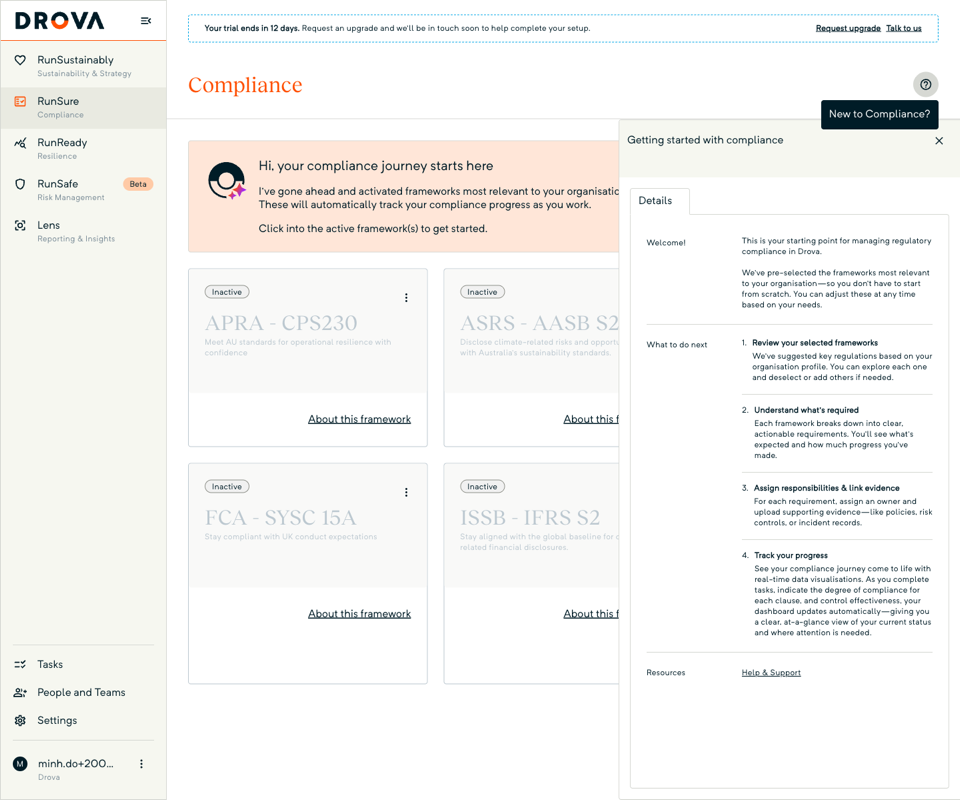
Open RunSure from the left menu. Its landing page is Compliance, a grid of framework cards, each with an Active or Inactive lozenge. On a new tenant a welcome banner from Sheila sits above the grid; the lozenge on each card, not the banner, tells you what is active.
The help button, with the tooltip New to Compliance?, opens a Getting started with compliance panel: a Welcome! note and a What to do next list covering reviewing your selected frameworks, understanding what is required, assigning responsibilities with evidence, and tracking progress. Beside the banner, Request a framework opens an email to Drova support, who load in any standard that is not in the grid.
In Drova
Activate the AASB ASRS S2 framework
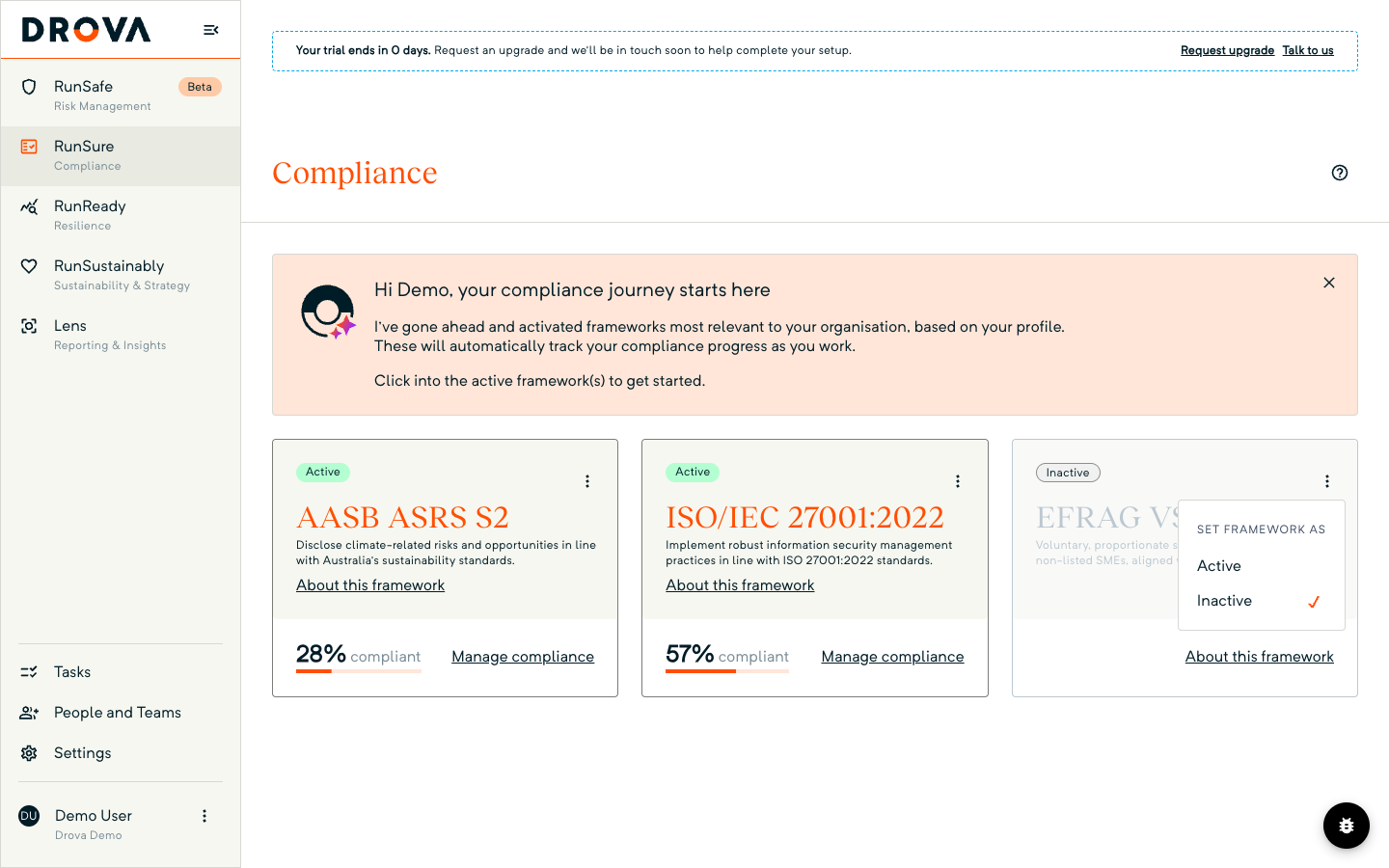
Find the AASB ASRS S2 card; its card title reads ASRS - AASB S2. If it already shows Active, skip ahead. Otherwise open the three-dot menu in the card's top-right corner, headed Set framework as, and choose Active; the tooltip reads Activate this framework to start working on compliance. The card redraws with a green Active lozenge, a 0% compliant progress bar and a Manage compliance button. About this framework links out to the standard's source text. While one card is saving, the menus on the other cards are disabled, so activate one framework at a time. Nothing in the standard is edited here; activation binds the AASB S2 clause tree to your organisation so progress can be tracked against it.
In Drova
Open the framework and assign owners
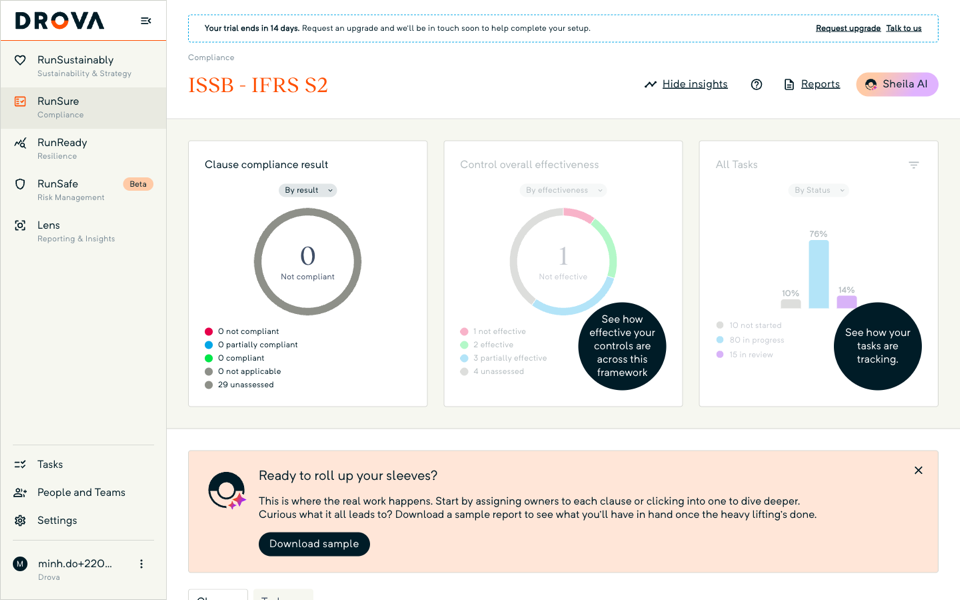
Choose Manage compliance. The framework detail opens with three insight cards, Clause compliance result, Control overall effectiveness and All Tasks, above a banner headed Ready to roll up your sleeves? with a Download sample button showing the report you are working towards. Below it, the Clauses tab holds the clause tree that mirrors the standard, with Status, Result and Owner filters.
On a fresh framework every clause shows Assign Owner, Not started and Unassessed. Assigning owners is the first job; the owners and tasks guide takes it clause by clause, and working a clause covers setting the result and attaching evidence. The Sheila AI chat opens on your first visit with the prompt What should I do next to move forward with this framework? if you want a suggested order. Sheila suggests; your owners decide.
Tip
Worked example
A Group 2 regional water utility starts its set-up in the first month of its reporting period beginning 1 July 2026. The company secretary owns governance, the strategy lead owns strategy, the risk manager owns risk management and the CFO owns metrics and targets. In Drova the sustainability lead activates AASB ASRS S2, opens Manage compliance and assigns those four people as owners across the clause tree. The CFO's team starts on Scope 1 and 2 data from the utility's pumping and treatment energy use and records that Scope 3 will follow in year two. The risk manager links the flood and drought risks already in the register as evidence under the risk management clauses. By the end of the first quarter the card reads 15% compliant and the board has seen its first roll-up. Figures and timeline illustrative. The wider AASB S2 workflow the utility moves into next is on the AASB S2 solution page.
Product guide. Steps and screenshots come from Drova product captures on a demo tenant, checked against the product atlas on 25 September 2026. Not yet reviewed by Customer Success; if a label or step differs from what you see in Drova, use the feedback below.
Frequently asked questions
Do I need to activate AASB S2 myself?
Check the card. If the AASB ASRS S2 card on the Compliance page shows Active, someone has already done it and you can open it with Manage compliance. If it shows Inactive, activate it from the card's menu.
Which climate frameworks does Drova ship?
AASB ASRS S2 sits in the Sustainability group alongside ISSB IFRS S2 and EFRAG VSME. If a standard you need is not on the Compliance page, use Request a framework and Drova support will load it in.
Can AASB S2 and IFRS S2 both be active?
Yes. More than one framework can be active at once on the Compliance page, and each active framework keeps its own clause tree, owners and progress.
What happens if I set the framework to Inactive?
Drova asks you to confirm, then stops tracking progress against the framework. Existing progress is retained: attestations, evidence links, control links and tasks are kept and tracking resumes when the framework is reactivated.
Can I add our own clauses to the framework?
Yes. An authorised user can extend an activated framework with custom sections or clauses. Drova marks them as custom so reviewers can tell your additions from the regulator's text.
Was this article helpful?
Related articles
- Drova help articles
Every product guide, in one place.
- How do you assign owners and tasks for AASB S2 work?
The first job after activation, owner by owner.
- How do you work an AASB S2 clause in Drova?
Open a clause, set the result, attach the evidence.
- How do you track AASB S2 compliance progress?
Read the roll-up once owners are working.
- Do I need to comply with AASB S2?
Groups, thresholds and first reporting dates.
Still stuck? Contact support.
