Product guide · RunSure module · Updated 25 September 2026
How do you work an AASB S2 clause in Drova?
Working an AASB S2 clause means turning one clause of the standard into a short set of testable requirements, each with an owner, a linked control, evidence and a recorded compliance result. It matters because a climate disclosure is only as defensible as the trail behind each clause, and assurance over sustainability reports is phasing in under the Corporations Act. Drova helps by having Sheila draft the requirements in RunSure, the compliance module of Drova's RunGood platform, while your team links the controls, attaches the evidence and sets the result. This guide shows the steps in Drova from the clause tree to the compliance roll-up.
Short answer
Working a clause means turning the regulator's wording into a short set of requirements you can test, then proving each one. For every requirement you name an owner, link the control that makes it true, attach the evidence, and record a compliance result with the reasoning behind it. In Drova you open the clause in RunSure, Sheila drafts the requirements, and your team does the linking, the attaching and the deciding.
- Four terms. A clause is one numbered disclosure requirement of AASB S2, as the regulator wrote it. A requirement is your own testable restatement of part of a clause. A control is the policy or process that makes a requirement true. Evidence is the document or record that shows the requirement is met.
- Requirements, not paragraphs. A clause is only workable once it is broken into statements someone can test and own.
- People set the result. Controls and evidence inform the compliance result; a person records it, with the reasoning.
- Roll-up from the bottom. Requirement results aggregate to the clause and clause results to the framework, so progress is visible before the report exists.
Note
Before you start
Before you start, have the standard's wording for the clause, your control list and the documents you expect to use as evidence to hand. This guide is for the person working a clause of the AASB S2 disclosure: a sustainability lead, a finance lead, a risk manager or the clause owner.
This guide does not cover activating the framework or generating the report, which have their own guides: set up AASB S2 in Drova and generate an AASB S2 disclosure report. If you are not yet sure how ready your organisation is across the four pillars, the ASRS readiness assessment gives you a starting point. Account help, sign-in and security settings are covered in the Drova help centre, not here.
How do you work through a clause?
- Read the clause and restate it in plain words. AASB S2 is written for every reporter at once. Say what the clause asks of your business specifically, and note which of the four pillars the clause sits under.
- Break it into testable requirements. Each requirement is one statement someone can prove true or false, such as "the board charter names climate-related risk as a standing responsibility". Keep them short, and keep them few.
- Give each requirement an owner. One named person accountable for the proof. The owners and tasks guide covers how ownership is assigned across the framework.
- Link the control that makes it true. A policy review cycle, a board reporting process, an emissions data check. Where the control already treats a climate risk in your enterprise risk register, reuse it rather than writing a second one; see how to add climate risks to your risk register.
- Attach the evidence and record the result. Board minutes, the policy, the report, the screenshot. Then set the compliance result and write the reasoning. Assurance over sustainability reports phases in under the AUASB's standards, so the trail matters from the first year; the evidence trail guide covers what to attach.
- Read the roll-up and close the gaps. Anything partially compliant or not compliant becomes a task with an owner and a date. The progress tracking guide covers reading the roll-up across the whole framework.
What the regulator requires
AASB S2 Climate-related Disclosures is the Australian Sustainability Reporting Standard for climate-related financial disclosures, issued by the AASB in September 2024 and based on IFRS S2 from the International Sustainability Standards Board. Its core content sits under four pillars: governance, strategy, risk management, and metrics and targets. Every clause you work belongs to one of them.
Reporting is phased under the Corporations Act 2001: Group 1 from annual reporting periods beginning on or after 1 January 2025, Group 2 from 1 July 2026 and Group 3 from 1 July 2027, with the thresholds set out in ASIC Regulatory Guide 280. Work out your group on the applicability page.
The standard does not prescribe how you organise the work behind a disclosure, but the disclosure has to be supportable. Sustainability reports must be audited under the Corporations Act, with the assurance requirements phased in between 1 January 2025 and 30 June 2030 on the timetable in the AUASB's sustainability assurance standards, from limited assurance at first to reasonable assurance in later years. Every required disclosure, clause by clause, is in the AASB S2 disclosures checklist.
In Drova
Open the clause
Open RunSure, the compliance module of Drova's RunGood platform, and choose Manage compliance on the AASB ASRS S2 card. The Clauses tab lists every clause of the standard as a tree, each carrying Assign Owner, Not started and Unassessed lozenges until someone works it. Filter by Status, Result or Owner, then click a clause.
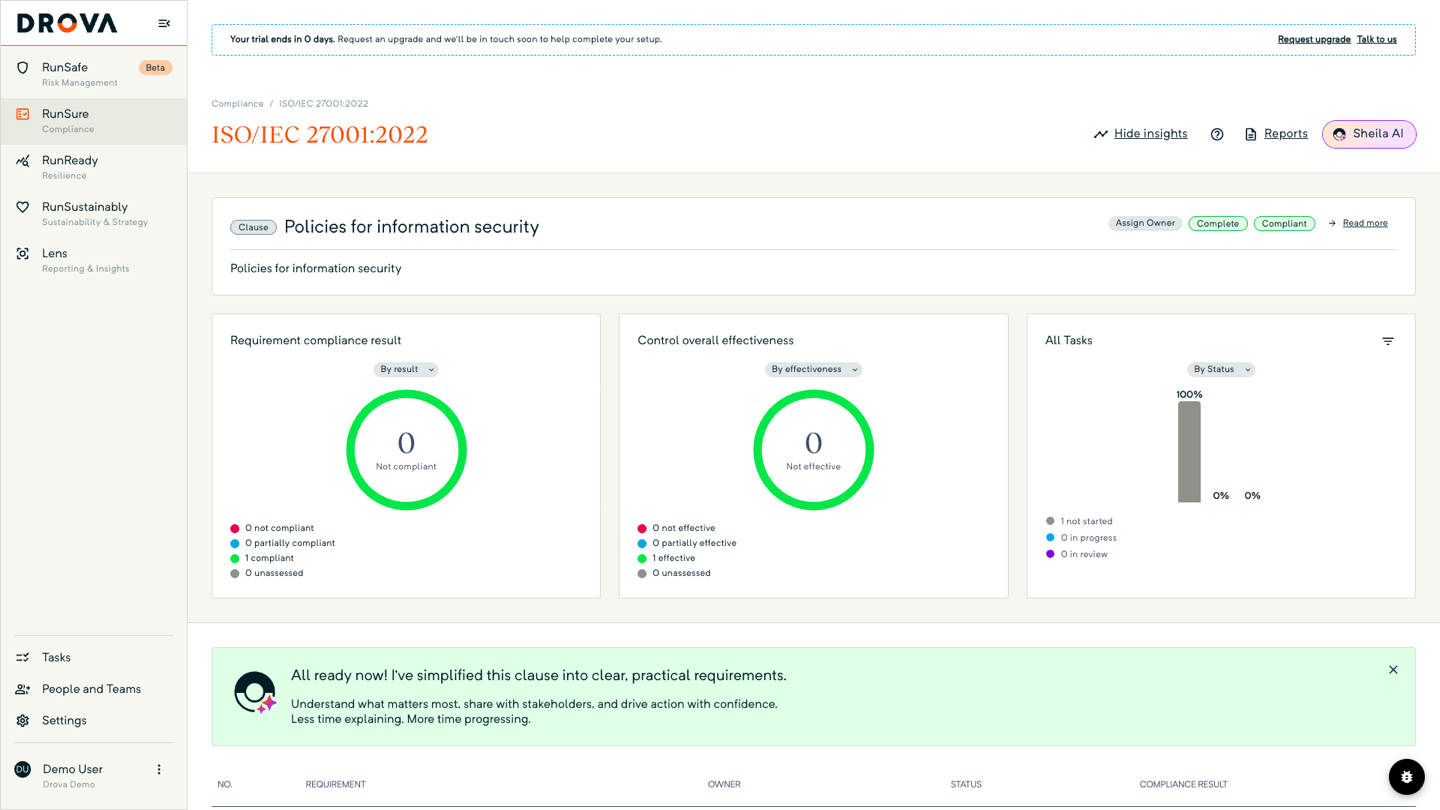
The first time a clause opens, Sheila, Drova's AI assistant, drafts a set of requirements from the clause wording and your organisation details. Each draft row carries a Sheila mark; hover the mark and it reads Generated by Sheila AI. Edit the drafts or delete what does not apply. The requirements table shows OWNER, STATUS and COMPLIANCE RESULT for each requirement.
To see the reasoning behind the drafts, ask Sheila How did you come up with these requirements, and what sources did you use?
In Drova
Attach controls, tasks and evidence
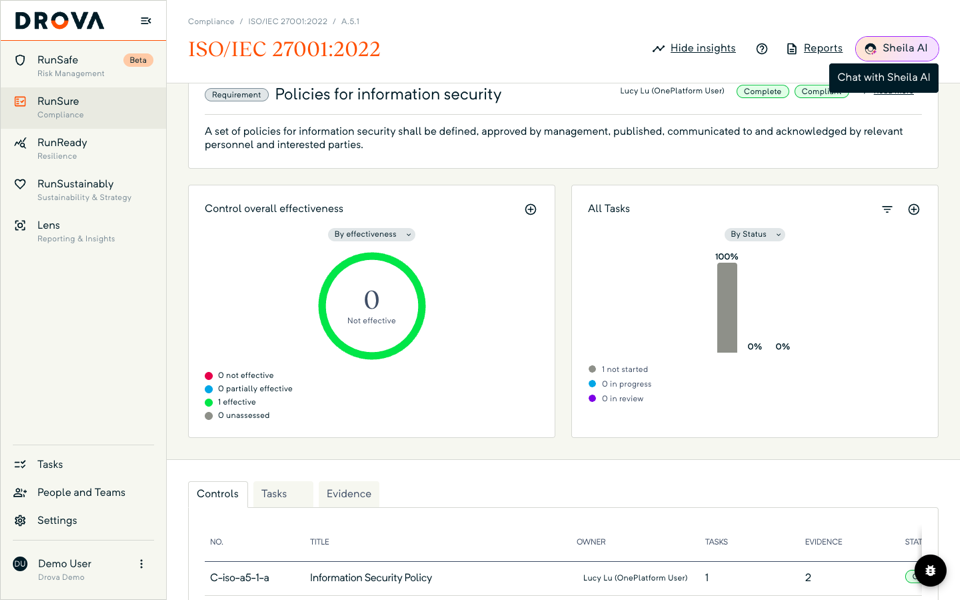
Click a requirement to open it. Three tabs sit under the summary card: Controls, Tasks and Evidence.
On Controls, choose Add controls and tick controls from your library, or use Create Control in the same dialog to write a new one, which links on save. A toast confirms Controls added successfully. The control library is shared with RunSafe, Drova's risk and controls module, so a control that already treats a risk in your register can attest a requirement here.
On Evidence, use Upload File for a document or Link Record for a record from elsewhere in Drova. Each row shows EVIDENCE FOR, TYPE and ADDED DATE. Evidence on this tab belongs to the requirement itself; a linked control keeps its own evidence on the control's page. On Tasks, add the follow-up work with an owner and a due date.
In Drova
Set the result and read the roll-up
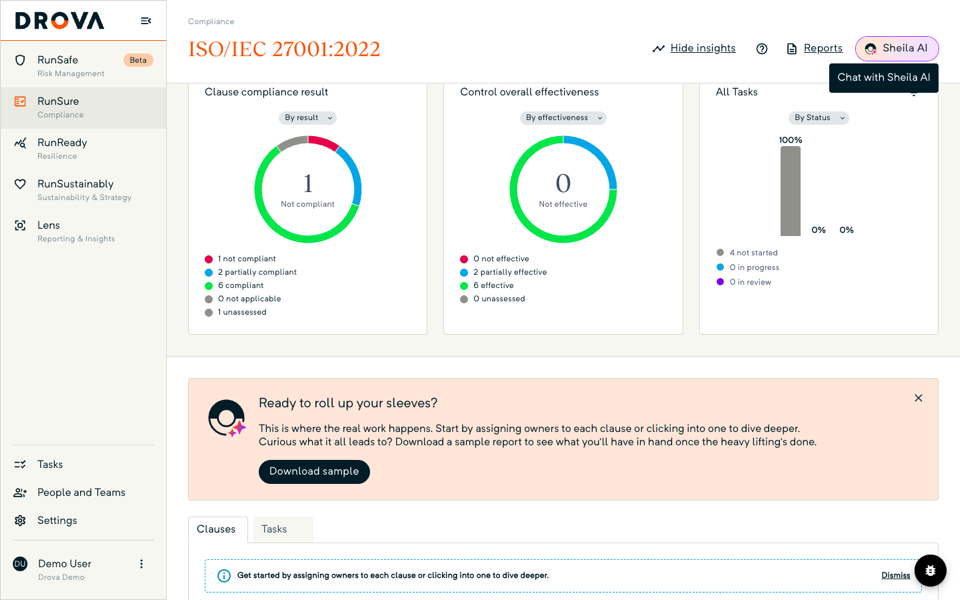
Your team sets each requirement's compliance result; nothing in Drova sets it for you. Once the evidence is in, record the result as Compliant, Partially compliant or Not compliant and move the status on from Not started. The Control overall effectiveness chart shows whether the linked controls are effective, partially effective, not effective or unassessed, which informs that call without making it.
The clause's own result is derived from its requirements, and the Requirement compliance result chart on the clause counts the requirements by result. Back on the framework page, Clause compliance result rolls every clause up, the framework card shows the percentage compliant, and Reports gives you the downloadable Compliance Status report. A clause that does not apply to your business can be marked Not applicable and leaves the roll-up.
Tip
Worked example
A Group 2 building materials manufacturer opens the governance clause on board oversight of climate-related risks and opportunities. Sheila drafts four requirements: the board charter names climate-related risk as a standing responsibility, the board receives a climate update at a set cadence, management has a named accountable executive, and directors have had climate competency training. The company secretary owns the first two requirements and the CFO the rest.
An existing board risk reporting control, already treating a strategic risk in RunSafe, is linked to the second requirement, and the charter and the last two sets of board minutes are uploaded as evidence. The first two requirements are set Compliant, the third Compliant once the CFO's delegation is attached, and the fourth Not compliant, with a task to book the training. The clause rolls up Partially compliant, and the gap shows on the framework page. Requirements, figures and timing are illustrative. What the AASB S2 framework in Drova covers end to end is on the AASB S2 solution page.
Product guide. Steps and screenshots come from Drova product captures on a demo tenant, checked against the product atlas on 25 September 2026. Not yet reviewed by Customer Success; if a label or step differs from what you see in Drova, use the feedback below.
Frequently asked questions
What is a requirement in AASB S2 terms?
AASB S2 sets out what to disclose, and Drova presents that content as clauses. A requirement is your own testable restatement of part of a clause: one statement, one owner, one set of evidence. Drova keeps the regulator's wording on the clause, with the requirements underneath it.
Does Sheila decide whether we comply?
No. Sheila drafts the requirements and can explain in the chat how it arrived at them; it does not set a compliance result. Your team edits the drafts, links the controls, attaches the evidence and records the result. The Sheila mark stays on the requirement row as provenance.
Can I reuse a control from my risk register?
Yes. Controls are one shared library across RunSafe and RunSure. A control that treats a climate risk in your enterprise risk register can be linked to a requirement to attest it.
Does adding evidence change the compliance result?
No. Evidence and linked controls inform the result; a person records it. Completing a task on a requirement does not change the result either; they are separate records.
What if a clause does not apply to us?
Mark the clause Not applicable. Its requirements stay visible but the clause drops out of the framework roll-up, and the decision can be reversed. Write down why, because an assurance provider may ask.
Was this article helpful?
Related articles
- Drova help articles
Every product guide, in one place.
- How do you set up AASB S2 in Drova for the first time?
Activate the framework and get the clause tree in front of you.
- How do you build an evidence trail for AASB S2 assurance?
What to attach to each requirement so the disclosure survives review.
- How do you track AASB S2 compliance progress?
Read the roll-up charts and the Compliance Status report.
- How do you generate an AASB S2 disclosure report in Drova?
From worked clauses to a downloadable disclosure.
Still stuck? Contact support.
