Product guide · RunSure and Reporting · Updated 24 September 2026
How do you generate an AASB S2 disclosure report in Drova?
An AASB S2 disclosure report is the set of climate-related financial disclosures an Australian reporting entity includes in the sustainability report lodged with its annual report under the Corporations Act 2001. It matters because the report is mandatory, phased in across three groups from 1 January 2025, and subject to assurance. Drova helps by generating the disclosure from the AASB S2 clauses, evidence, controls and materiality assessment your team has already recorded, and this guide covers what the report contains and the steps in Drova.
Short answer
The report covers four pillars: governance, strategy, risk management, and metrics and targets, for the climate-related risks and opportunities that could reasonably be expected to affect your cash flows, access to finance or cost of capital. To produce it you need a materiality assessment, a scenario analysis, your Scope 1 and 2 greenhouse gas emissions (Scope 3 from your second reporting year) and evidence behind every statement.
RunSure is the compliance module of Drova's RunGood platform, and Reporting is where generated documents land. In RunSure you activate the AASB S2 framework, work through its clauses with Sheila drafting the requirements, attach evidence and controls, then generate the disclosure as a downloadable document. Sheila drafts; your team decides what is disclosed and lodges the report.
- Governance, strategy, risk, metrics. Every disclosure in the report sits under one of the four pillars AASB S2 carries over from IFRS S2.
- Scope 3 from the second year. Scope 1 and 2 emissions are required from year one; AASB S2 lets you leave out Scope 3 in the first year you apply the standard.
- Assurance-ready from the start. Assurance phases in under the AUASB's ASSA 5010, so each statement needs a document or a record behind it from the first year.
Note
Before you start
This guide is for the person preparing or reviewing the AASB S2 disclosure: a sustainability lead, a finance lead or a risk manager. Have last year's financial report, your risk matrix and your current climate issue list to hand. If AASB S2 is not yet active in your tenant, follow How do you set up AASB S2 in Drova for the first time? first.
If you have not confirmed which reporting group you are in, or how ready your governance, data and evidence are, take the ASRS readiness assessment before you start. Account help, sign-in and security settings are covered in the Drova help centre, not here.
What goes into the report?
An AASB S2 disclosure report is built from six things: your reporting group and period, a materiality assessment, a scenario analysis, your metrics and targets, the four pillars written with evidence behind each statement, and lodgement with the annual report.
- Confirm your group and first reporting period. Group 1 reports for financial years beginning on or after 1 January 2025, Group 2 from 1 July 2026 and Group 3 from 1 July 2027, with the size thresholds set out in ASIC Regulatory Guide 280. Your first sustainability report covers the first financial year that begins on or after your group's start date. The applicability page settles which group you are in.
- Complete the materiality assessment. Identify the climate-related risks and opportunities that could reasonably be expected to affect your prospects, and document the process, because the process is itself a disclosure. In Drova, see How do you assess financial materiality for AASB S2?.
- Run the scenario analysis. Test your strategy against at least two climate scenarios: one where global warming well exceeds 2 degrees Celsius above pre-industrial levels and one limited to 1.5 degrees, as RG 280 sets out. AASB S2 asks for an approach commensurate with your circumstances, and the scenarios, method and assumptions you used are disclosed.
- Gather the metrics and targets. Scope 1 and 2 greenhouse gas emissions, Scope 3 from the second year, any internal carbon price, remuneration links and the targets you have set, with the basis for each.
- Write the four pillars with evidence behind each statement. Board oversight and management roles; how climate affects the business model and financial position; how risks are identified, assessed and managed; the numbers. The AASB S2 disclosures checklist lists what each pillar asks for, and How do you build an evidence trail for AASB S2 assurance? shows where the evidence lives in Drova.
- Lodge with the annual report. The sustainability report is the fourth report in the annual report, alongside the financial report, directors' report and auditor's report, and it is subject to the assurance that phases in under the AUASB's ASSA 5010 timeline.
What the regulator requires
AASB S2 Climate-related Disclosures is the Australian standard that sets what a sustainability report must say about climate. It is based on the ISSB's IFRS S2 and requires disclosure across governance, strategy, risk management, and metrics and targets, including scenario analysis and Scope 1, 2 and 3 greenhouse gas emissions. Mandatory reporting is phased under the Corporations Act 2001 across three groups, and ASIC Regulatory Guide 280 explains how ASIC administers it.
- Sustainability report. The report lodged with the annual report under the Corporations Act 2001. It contains the climate statements, the notes to the climate statements and the directors' declaration.
- Financial materiality. Whether a climate-related risk or opportunity could reasonably be expected to affect your cash flows, access to finance or cost of capital over the short, medium or long term.
- Clause. One numbered disclosure requirement of AASB S2, shown in Drova as a node in the framework's clause tree with its own requirements, controls, evidence and tasks.
- Evidence. A document or a linked platform record that shows a requirement is met: a board charter, a policy, a risk record, a scenario test.
- Assurance. An independent review of the sustainability report under the AUASB's ASSA 5000, phased in from limited to reasonable assurance under ASSA 5010.
The ASRS reporting guide sets out the operating process from scope to assurance-ready disclosure. The report is a disclosure of what you have done, not a plan. Drova generates it from the assessments, clauses, evidence and controls already recorded in the platform, which is why the steps below start with the framework rather than the document.
In Drova
Activate the AASB S2 framework
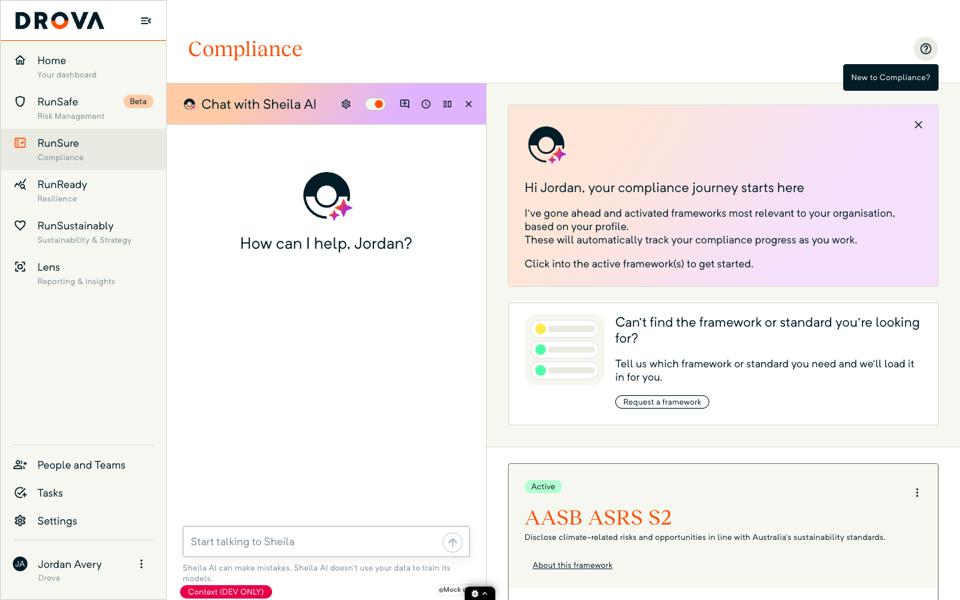
Open RunSure, then Frameworks. On the AASB ASRS S2 card, open the three-dot menu, choose Set framework as, then Active, then Manage compliance. The framework opens as a clause tree that mirrors the standard, so the four pillars and their disclosure requirements are already laid out.
In Drova
Work the clauses with evidence and controls
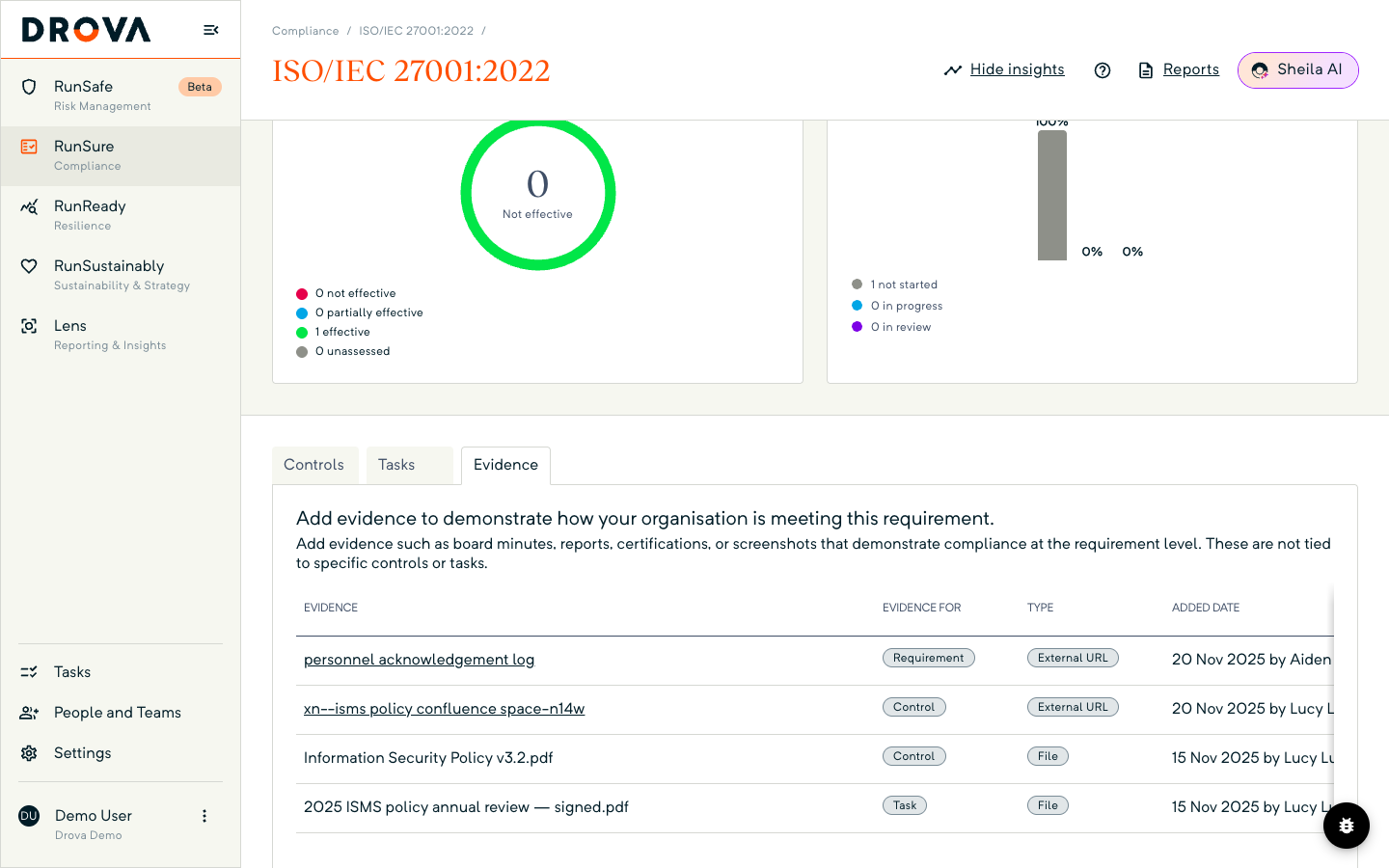
Open a clause. Sheila drafts the requirements for it, each marked Generated by Sheila AI, and your team sets the status and compliance result for each requirement. On a requirement's Evidence tab, attach evidence with Upload File or Link Record; on its Controls tab, link the controls that satisfy it; on its Tasks tab, add tasks for anything outstanding.
Results roll up to the clause and to the framework card's per cent compliant figure, so you can see how much of the framework is evidenced before you generate anything. How do you work an AASB S2 clause in Drova? covers each tab, and How do you assign owners and tasks for AASB S2 work? covers ownership.
In Drova
Generate and download the disclosure
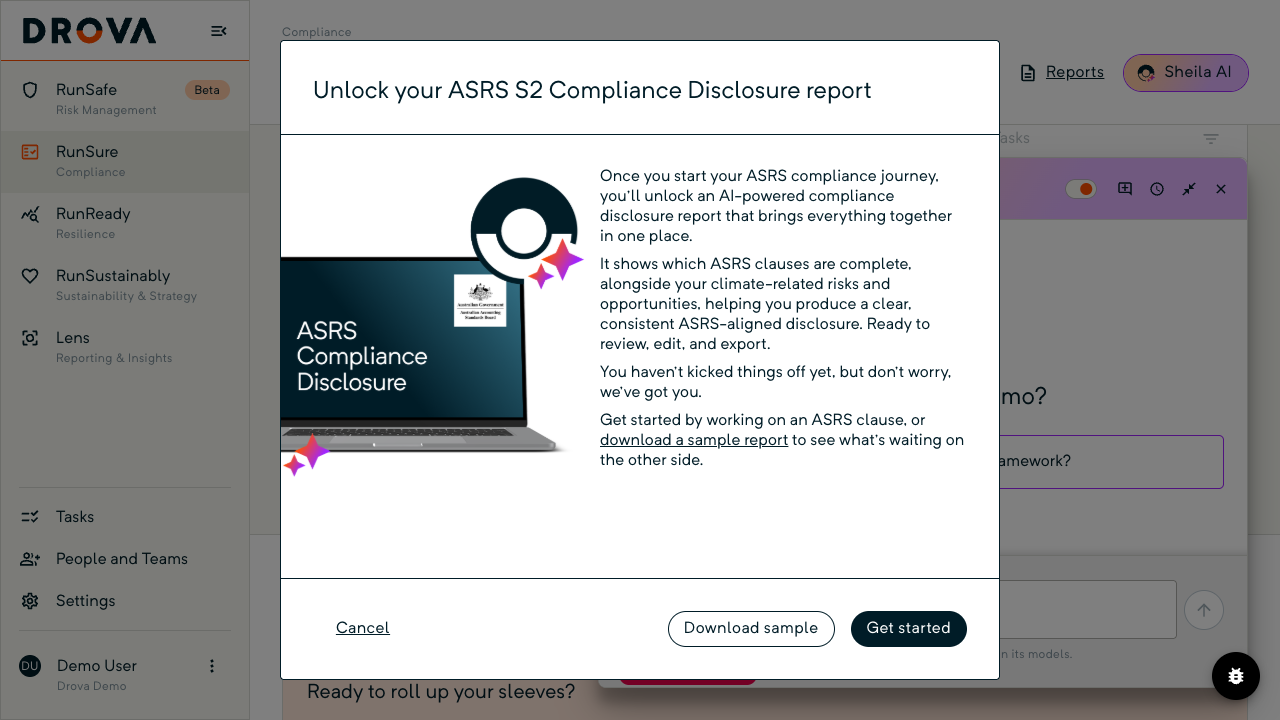
From the framework header, open Reports. Under Generate AI Powered Report, choose ASRS S2 Compliance Disclosure. On a framework where no clauses have been worked yet you will first see Unlock your ASRS S2 Compliance Disclosure report with Download sample and Get started; the report unlocks once you have started working ASRS clauses, and Get started takes you back to the framework to begin.
Once unlocked, Sheila prepares the report in the background and tells you when it is ready, and the document lands in Reporting. Under Download, Compliance Status gives you the clause-by-clause status export for the audit file; How do you track AASB S2 compliance progress? explains how to read it. Your team reviews, edits and lodges; Drova drafts.
Tip
Worked example
A Group 2 logistics company activates AASB S2 in August 2026, six weeks into its first reporting period. Over the following weeks the sustainability lead works through the governance and risk management clauses, attaching the board charter, the risk policy and the completed financial materiality assessment as evidence. The finance team adds Scope 1 and 2 figures under metrics and targets and records that Scope 3 will follow in year two.
With clauses worked and evidenced, the disclosure report unlocks and is generated for the CFO to review against the checklist before it goes into the annual report. Timeline illustrative. What the AASB S2 solution covers end to end, from materiality to disclosure, is on the solution page.
Product guide. Steps and screenshots come from Drova product captures on a demo tenant, checked against the product atlas on 24 September 2026. Not yet reviewed by Customer Success; if a label or step differs from what you see in Drova, use the feedback below.
Frequently asked questions
What does an AASB S2 disclosure report contain?
Disclosures across governance, strategy, risk management, and metrics and targets for climate-related risks and opportunities, including scenario analysis and Scope 1, 2 and 3 greenhouse gas emissions, as AASB S2 requires and as the Corporations Act phases in across three groups.
Can Drova generate the whole report?
Drova generates the ASRS S2 Compliance Disclosure from the framework clauses, evidence, controls and the materiality assessment your team has recorded. Your team reviews it, edits where needed and lodges it. Sheila drafts; people sign off.
Why does the report say it needs to be unlocked?
On a framework where no clauses have been worked yet, the report is locked until there is recorded clause data to generate from. Get started takes you to the framework to begin, and Download sample shows what the finished report looks like.
Do I need Scope 3 emissions in the first report?
Scope 1 and 2 emissions are required from the first reporting year. AASB S2 gives relief from Scope 3 in the first year an entity applies the standard, and Scope 3 is required from the second year.
When does assurance apply?
Assurance over sustainability reports phases in under the AUASB's ASSA 5010, moving from limited assurance to reasonable assurance across the three reporting groups. Build the evidence trail from the first year.
Where does the generated report go?
Sheila prepares the report in the background and tells you when it is ready. The document lands in Reporting, where earlier reports are listed too, and generating again from the framework produces an updated version.
Was this article helpful?
Related articles
- Drova help articles
Every product guide, grouped by stage.
- How do you set up AASB S2 in Drova for the first time?
Activate the framework and open its clause tree.
- How do you work an AASB S2 clause in Drova?
Requirements, compliance results, evidence, controls and tasks per clause.
- How do you build an evidence trail for AASB S2 assurance?
Where the evidence lives, and how an assurance provider finds it.
- How do you track AASB S2 compliance progress?
Clause roll-ups, result filters and the compliance status download.
Still stuck? Contact support.
