Product guide · RunSure and Tasks · Updated 25 September 2026
How do you assign owners and tasks for AASB S2 work?
Assigning owners and tasks for AASB S2 work means naming one accountable person for each climate-related disclosure and breaking that person's work into dated tasks. It matters because AASB S2 spans the board, finance, risk and operations, and a disclosure with no owner drifts past the reporting date. Drova helps by keeping each task on the requirement or control it serves in RunSure, with the owner assigned in the same dialog and every task tracked from one Tasks inbox.
Short answer
Assign AASB S2 work by disclosure, not by department. Name one accountable owner per requirement, then break the work into dated tasks with one person on each: the board paper, the scenario analysis, the emissions figures, the evidence. Keep each task on the requirement or control it serves, so the task list doubles as the assurance trail.
In Drova you add the task from the requirement's Tasks tab or from a control's panel, assign the owner in the same dialog, and every owner sees their work in the Tasks inbox. RunSure is the compliance module of Drova's RunGood platform, and Tasks is the platform-wide inbox that shows every task a person owns or oversees across the platform.
- One owner per requirement. Shared ownership is no ownership; one name on a requirement gets it done.
- Tasks live on the work they serve. A task on the requirement or control keeps the why next to the what.
- Dated, and visible to the owner. A dated task lands in the owner's inbox, grouped by overdue and upcoming.
Note
Before you start
This guide is for the person coordinating the AASB S2 disclosure: a sustainability lead, a finance lead or a risk manager. Have the AASB S2 framework active in Drova (see how to set up AASB S2 in Drova for the first time), your reporting timetable and the names of the people who will own each pillar to hand.
Four terms recur in this guide. A requirement is one disclosure obligation inside an AASB S2 clause. A control is a measure linked to a requirement that shows how the obligation is met. A task is one dated piece of work with one owner. Evidence is the document, record or figure that shows the work was done.
If you are still working out where your organisation stands, the ASRS readiness assessment gives you a starting point before you assign anything. Inviting people into your tenant happens in People & Teams and is not covered here. Account help, sign-in and security settings are covered in the Drova help centre.
How do you split AASB S2 work into owners and tasks?
- Start from the four pillars. Governance, strategy, risk management, and metrics and targets. Each has a natural home: the company secretary for governance, strategy and finance for strategy, the risk function for risk management, finance or operations for the emissions numbers. Name one accountable owner per pillar.
- Break each pillar into its disclosures. Work one requirement at a time. Risk management alone asks how you identify, assess, prioritise and monitor climate-related risks and opportunities, and how that sits inside overall risk management: several tasks, not one.
- Write each task as a finished output with a date. "Board minutes recording climate oversight, filed" rather than "governance". One person, one due date, one output. If a task needs two people, it is two tasks.
- Make the evidence the definition of done. Assurance over the sustainability report phases in under the AUASB's timeline, so a task closes when the document, record or figure is attached, not when the meeting happens. See how to build an evidence trail for AASB S2 assurance.
- Sequence to the reporting timetable. The materiality assessment and the Scope 1 and 2 figures usually come first because the strategy and risk disclosures draw on them. Work back from the date the annual report is lodged.
- Review the list weekly, by owner. Look at what is overdue and due soon, and reassign where someone has left. An overdue task nobody is watching is a gap in the trail, not just a late job.
What the regulator requires
AASB S2 Climate-related Disclosures is the Australian Sustainability Reporting Standard that sets out what an entity must disclose about climate-related risks and opportunities under four pillars: governance, strategy, risk management, and metrics and targets. It does not say who should own the work, but it does ask how the work is run.
The risk management section of AASB S2 asks for the processes an entity uses to identify, assess, prioritise and monitor climate-related risks and opportunities, including whether and how those processes are integrated into its overall risk management. A task list with named owners and dates is the plainest evidence that such a process exists.
Reporting is phased in under the Corporations Act 2001 across three groups of entities, starting with the largest for financial years beginning on or after 1 January 2025. ASIC Regulatory Guide 280 explains how ASIC applies the sustainability reporting obligations and gives practical guidance on complying with them. Check your group on the AASB S2 applicability page. The disclosures you are assigning are listed on the AASB S2 disclosures checklist.
The sustainability report forms part of the annual report, and assurance over it phases in under the AUASB's sustainability assurance timeline (ASSA 5010), from limited assurance first to reasonable assurance later. The evidence attached to each task is what an assurance practitioner will look for.
In Drova
Add a task to a requirement or control
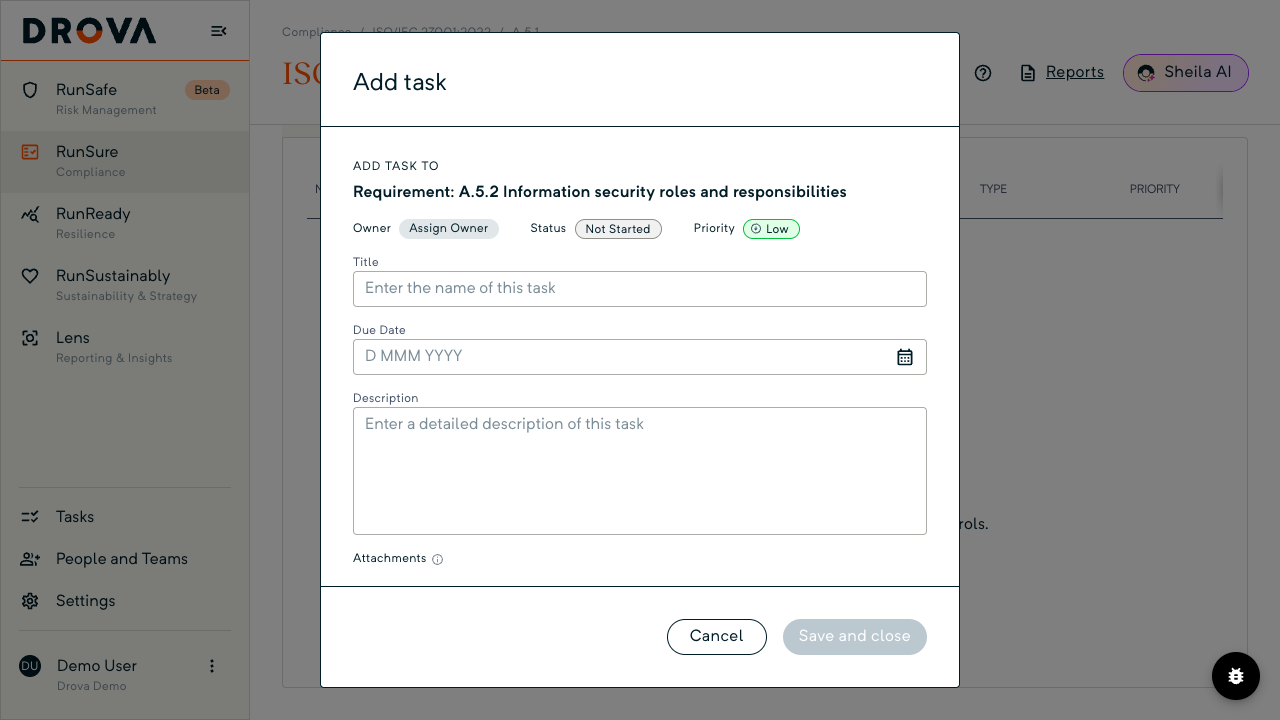
Open RunSure, the AASB ASRS S2 framework, then a clause and a requirement (see how to work an AASB S2 clause in Drova). Below the summary card the Controls, Tasks and Evidence tabs run. Open Tasks and choose Add task: on a requirement with no tasks yet it is the button under the empty state, and once tasks exist it sits beside Create tasks to support this requirement. The plus on the All Tasks card above the tabs opens the same dialog.
The Add task dialog names what it is attached to under Add task to, then Owner, Status (preset Not Started) and Priority (preset Low), with Title, Type (preset General), Due Date, Description and Attachments beneath. Title, owner and due date are required before Save and close activates.
To put the task on a control instead, open the control from the Controls tab and choose Add task on its Tasks tab (tenants still on the earlier layout label this button Create Task). The dialog is the same; Add task to names the control rather than the requirement.
In Drova
Assign the owner
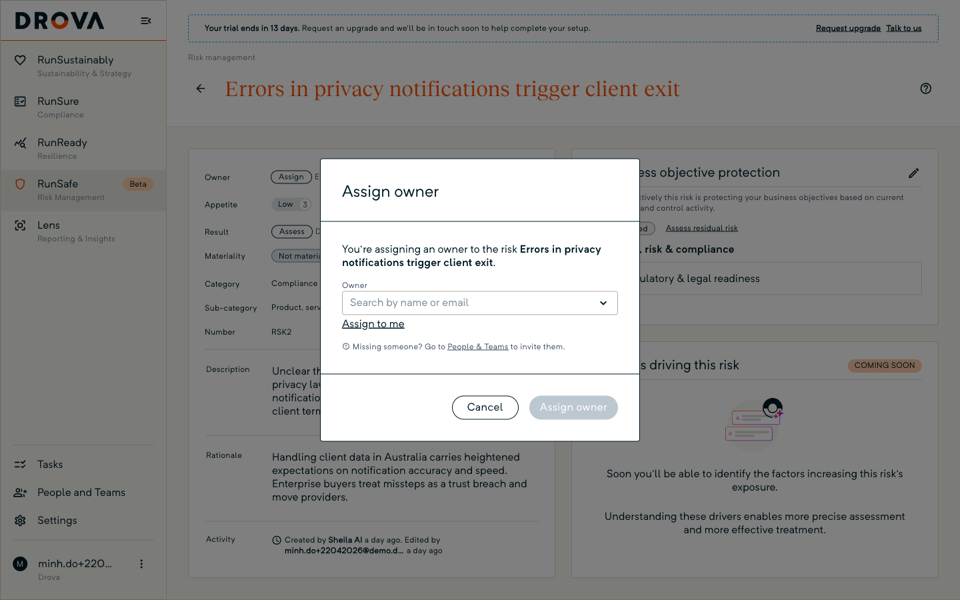
Choose Assign Owner in the dialog. The Assign owner dialog opens over it with a single Owner field: search by name or email and pick a person, or use the Assign to me link when you are on the list yourself, then confirm with Assign owner. A hint beneath the field reads Missing someone? Go to People & Teams to invite them.
The same dialog assigns the requirement itself. On the requirement's summary card the owner lozenge reads Assign Owner until someone is named, and that is where the accountable owner for the requirement belongs. Once a task exists, its owner is changed from the Owner row on the task panel, so handing work over when someone leaves is one change, not a new task.
In Drova
Track every task from one inbox
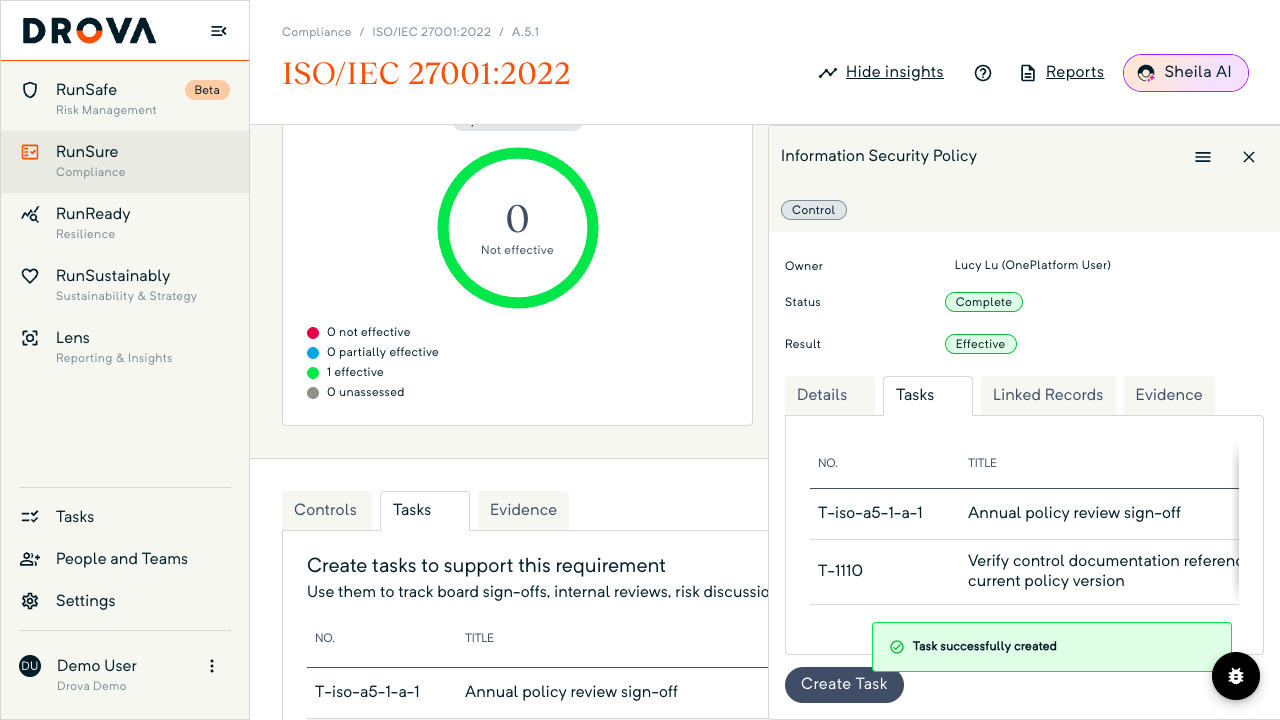
Every task you create shows in the Tasks inbox in the left navigation, whichever requirement or control it sits on. After Save and close a toast reads Task successfully created and the task appears on the requirement's Tasks tab; a task added to a control shows on both the control's and the requirement's Tasks tab.
The inbox groups work by date under Overdue, Due within 3 days, Upcoming and Complete. The Owned by me toggle switches between your own tasks and All tasks, and the Task leaders card shows each person's complete and overdue counts.
Click a row to open the task panel. There Status moves from Not Started through In Progress and In Review to Completed, and Task for links back to the requirement or control.
Tip
Worked example
A Group 2 agribusiness in regional New South Wales splits its first AASB S2 report across four owners: the company secretary for governance, the CFO for strategy and metrics, the chief risk officer for risk management, and the sustainability manager for the assessment and the evidence. In Drova every requirement carries one of those four names.
Under governance the company secretary owns two tasks: a board paper on climate oversight due in month two, and the signed minutes attached as evidence a fortnight later. Under risk management the chief risk officer owns a task to take the two material risks into the enterprise risk register. Finance owns the Scope 1 and 2 figures, due before the strategy work starts.
Each Monday the sustainability manager opens the Tasks inbox, switches Owned by me off to see everyone's tasks, clears whatever is overdue and then checks the framework's progress (see how to track AASB S2 compliance progress). How Drova supports the whole AASB S2 programme, from materiality through to the disclosure report, is on the AASB S2 solution page. Roles and timeline illustrative.
Product guide. Steps and screenshots come from Drova product captures on a demo tenant, checked against the product atlas on 25 September 2026. Not yet reviewed by Customer Success; if a label or step differs from what you see in Drova, use the feedback below.
Frequently asked questions
Who should own AASB S2 work?
One accountable owner per requirement, drawn from the function that produces the evidence, so governance sits with the company secretary and the emissions figures with finance or operations. The sustainability lead usually coordinates rather than owning everything.
Should a task sit on the requirement or on a control?
On the control when the work is about that control, such as re-testing it or collecting its evidence; on the requirement for anything else, such as a board paper. A task on a control also shows on the requirement's Tasks tab, so nothing is hidden either way.
What happens when an owner leaves?
Reassign it from the Owner row on the task panel. The Task leaders card in the Tasks inbox shows who is carrying overdue work, which makes the handover list easy to build.
Can I require the owner to attach evidence before closing a task?
Where formal confirmation is switched on for your tenant, the Add task dialog has a SETTINGS section with two toggles: Require task owner to formally confirm task completion and Require task owner to upload or link evidence to complete task. The owner then closes the task from a Formal confirmation tab on the task panel. Evidence added there attaches to the task, not the requirement; add it on the requirement's Evidence tab too if it should count there.
Does completing a task make the requirement compliant?
No. Your team sets the requirement's compliance status from its evidence; completing a task does not change it. Tasks track the work; the status records the judgement.
Was this article helpful?
Related articles
- Drova help articles
Every product guide, in one place.
- How do you track AASB S2 compliance progress?
Where the tasks and evidence roll up into a status.
- How do you work an AASB S2 clause in Drova?
The requirement page the tasks hang off.
- How do you build an evidence trail for AASB S2 assurance?
What each task should leave behind.
- How do you set up AASB S2 in Drova for the first time?
Activate the framework before you assign anything.
Still stuck? Contact support.
