Product guide · RunSure and RunSustainably · Updated 25 September 2026
How do you build an evidence trail for AASB S2 assurance?
Every statement in an AASB S2 disclosure needs a document, a record or a written rationale behind it, because the sustainability report is audited under the Corporations Act 2001. This guide covers what an evidence trail has to hold, then the steps in Drova to attach evidence, keep the rationale on each score and export the audit file.
Short answer
An evidence trail for AASB S2 assurance is the set of documents, records and written rationales that let an assurance provider trace every statement in your climate disclosure back to its source. It matters because assurance over the sustainability report is phasing in from limited to reasonable assurance, and a statement with nothing behind it cannot be assured at either level. Drova helps by keeping each artefact on the AASB S2 requirement it supports, the rationale on every materiality score, and the dated exports for the audit file.
Build the trail as you go rather than at the end. For each disclosure, keep the artefact that supports it, the name of the person who produced it and the date, and the reasoning behind any judgement such as a materiality score or a scenario assumption.
In Drova the trail lives in three places: the Evidence tab on every AASB S2 requirement in RunSure, the rationale and files on every risk, opportunity and impact in RunSustainably, and the two spreadsheets you download for the audit file. RunSure is the compliance module of Drova's RunGood platform, and RunSustainably is its sustainability and materiality module.
- Statement, source, judgement. Every disclosure needs the artefact behind it and, where a decision was made, the written reason for it.
- Who and when. A reviewer wants to know who added each item and on what date, not just that it exists.
- Built in year one. Limited assurance comes first and reasonable assurance later, and both look back at the same trail.
Note
Before you start
This guide is for the person preparing or reviewing the AASB S2 disclosure: a sustainability lead, a finance lead or a risk manager. Have your completed materiality assessment, the board and committee papers that cover climate, and last year's audit file to hand.
It does not cover choosing an assurance provider or the assurance engagement itself. If you have not yet worked out which reporting group you fall into or how far along you are, the ASRS readiness assessment gives you a starting point, and the AASB S2 solution page shows how RunSure and RunSustainably fit together for this work. Account help, sign-in and security settings are covered in the Drova help centre, not here.
How do you build the evidence trail?
- List every statement you will make. Work through the four pillars, governance, strategy, risk management, and metrics and targets, and write down each disclosure you plan to make. The AASB S2 disclosures checklist is the starting list.
- Name the artefact behind each one. Board minutes for oversight, the risk policy for integration, the materiality assessment for risks and opportunities, the scenario analysis for climate resilience, meter and invoice data for Scope 1 and 2 emissions. If no artefact exists yet, that is a task, not a gap to explain later.
- Write the rationale for every judgement. Materiality scores, time horizons, scenario choices and the boundary of your emissions are decisions, so record why you decided as you did and the source you relied on. Reviewers read the reasoning first.
- Record who and when. Every item carries the name of the person who added it and the date, and where someone signed off, keep that record too. Assurance is about tracing, and a file with no owner cannot be traced. The owners and tasks guide covers how ownership is recorded in Drova.
- Keep the evidence with the requirement, not in a shared folder. Attach each artefact to the disclosure it supports, so a reviewer can go from statement to source without asking. One document can support several statements, so attach it to each of them.
- Export the trail at period end and keep the version. Take a dated snapshot of the assessment results and the compliance status when the report is lodged with the annual report. Next year's reviewer will compare against it.
What the regulator requires
AASB S2 Climate-related Disclosures is the Australian Sustainability Reporting Standard that sets out what a sustainability report must say about climate-related risks and opportunities. It applies to reporting periods beginning on or after 1 January 2025, and its requirements sit under four pillars: governance, strategy, risk management, and metrics and targets, as set out in AASB S2 on the AASB standards portal.
The sustainability report is lodged with the annual report under the Corporations Act 2001 and must be audited, with the audit requirements phased in between 1 January 2025 and 30 June 2030, as ASIC Regulatory Guide 280 explains. Assurance moves from limited assurance in the first years to reasonable assurance in later years, on the timeline in the AUASB's ASSA 5010, as described on the AUASB sustainability assurance page. Limited assurance is the lower level of assurance; reasonable assurance is the higher level, the same level that applies to the financial report.
AASB S2 also requires you to disclose the processes you use to identify, assess, prioritise and monitor climate-related risks and opportunities, and whether and how those processes are integrated into your overall risk management (paragraphs 24 and 25 of the standard). The process itself is therefore a statement that needs evidence behind it.
Reporting is phased across three groups from 1 January 2025, with the size thresholds for each group in ASIC Regulatory Guide 280. Check your group and first reporting period on the applicability page. The statements the trail has to support, clause by clause, are on the AASB S2 disclosures checklist.
Drova does not verify evidence for you. Your team decides whether an artefact demonstrates the requirement and sets the compliance result; Drova records what was attached, by whom and when.
In Drova
Attach evidence to each AASB S2 requirement
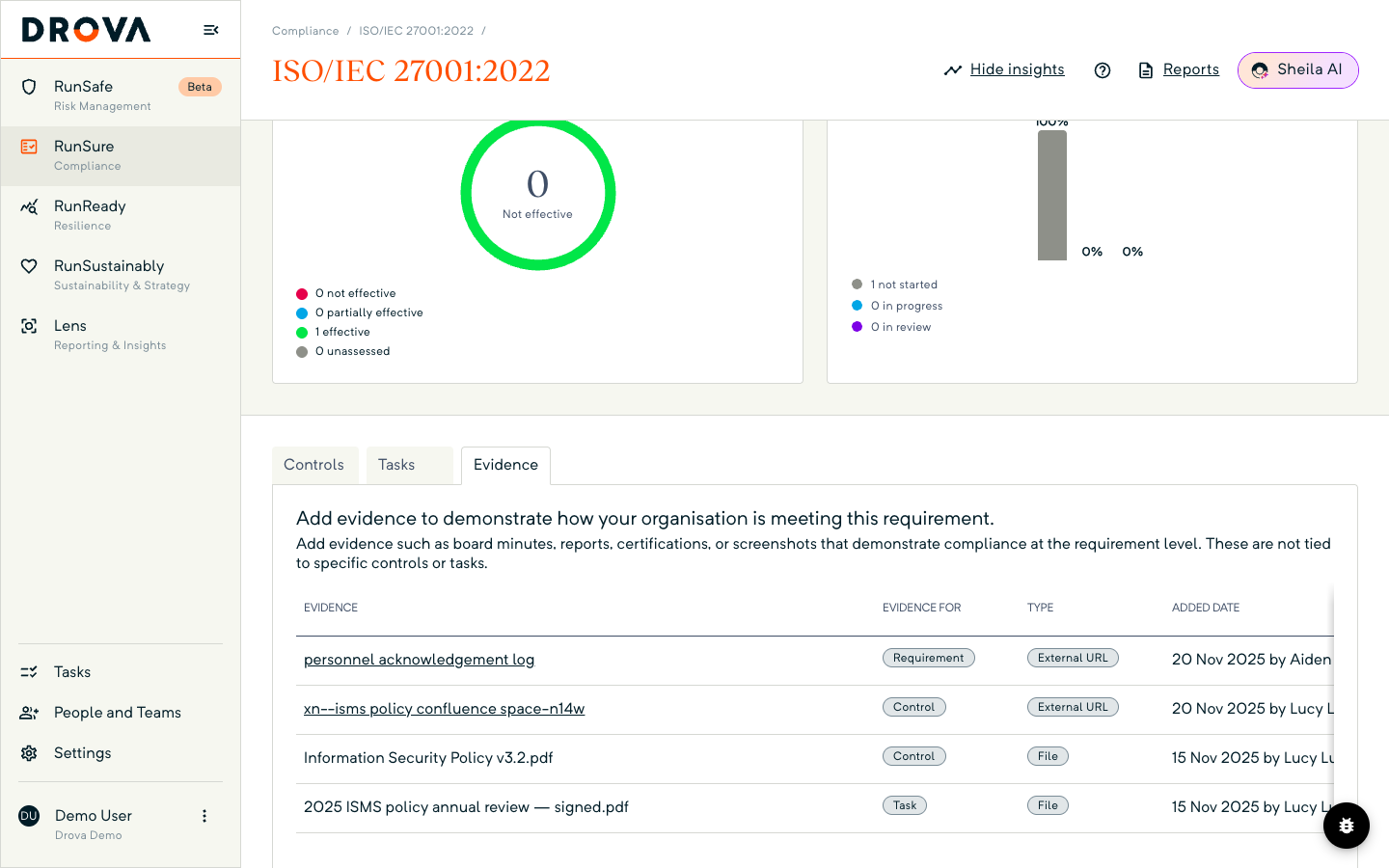
Open RunSure, open the AASB ASRS S2 framework and click into a requirement. In Drova a requirement is the lowest level of a clause and the level at which evidence is attached; the clause guide covers how clauses and requirements fit together. Below the requirement summary, choose the Evidence tab, which sits beside Controls and Tasks.
Use Upload File for a document such as a board minute or a policy, or Link Record to point at a record already in Drova, such as a risk or a scenario test. A web page can also be added; the table shows it as External URL. Each row shows what the item is evidence for (the requirement, a linked control or a task), its type, and the date it was added with the name of the person who added it.
Drova does not judge the evidence. Your team reviews it and sets the requirement's compliance result.
In Drova
Keep the rationale on every score and export the result
Open RunSustainably, then Assessments, and open an issue's Financial Materiality or Impact Materiality page. Every risk, opportunity and impact carries a Rationale field and a Files column. The rationale is the written reason for the judgement: why the item applies and why it is scored as it is. The files are the modelling, benchmarks or expert opinions behind the score.
Write the rationale before you mark the item Complete; it is the record a reviewer reads first. The financial materiality guide covers the scoring itself.
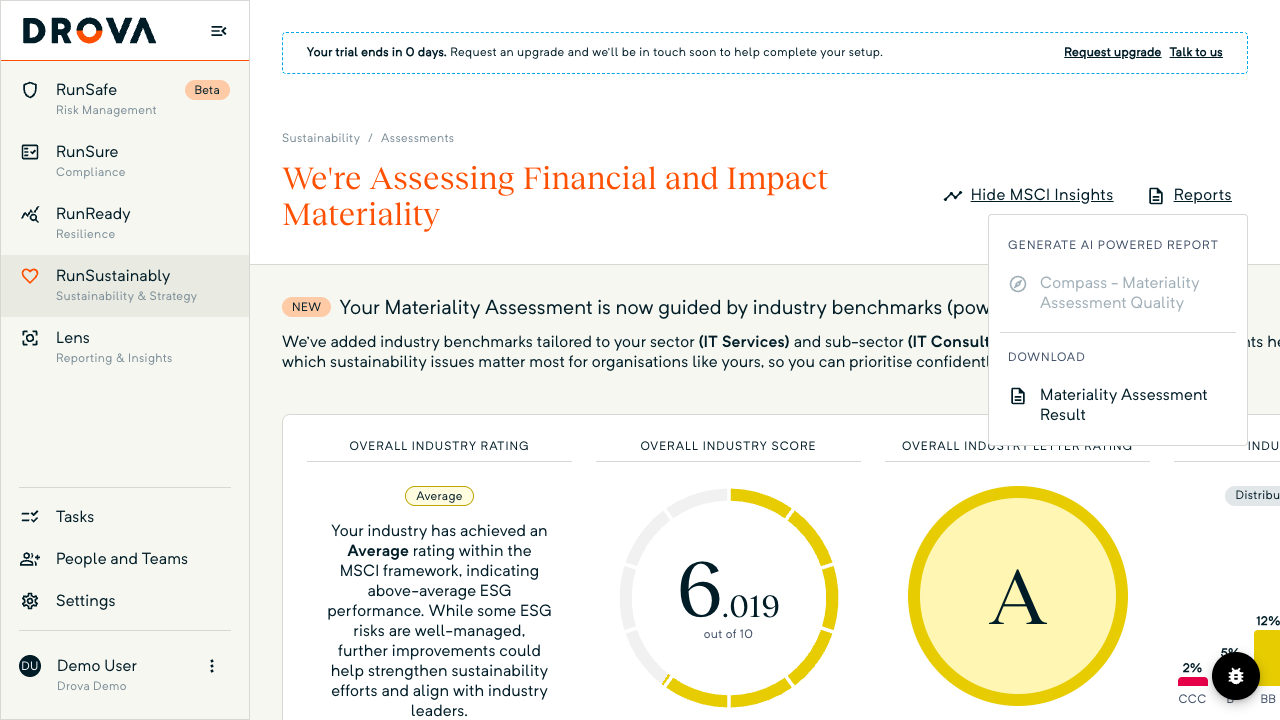
When the assessment is done, return to the issues list, open Reports in the page header and choose Materiality Assessment Result under Download. The spreadsheet lists every issue's classification, the risks, opportunities and impacts behind it, their scores and ratings, and the rationales, in one file for the assurance provider. The export guide walks through that download step by step.
In Drova
Download the compliance status for the audit file
Back in RunSure, on the AASB ASRS S2 framework, open Reports in the header and choose Compliance Status under Download. Drova builds a spreadsheet from the framework's current state, clause by clause, with the compliance status of each clause and its linked controls, tasks and evidence, and your browser downloads it with the framework name and the date in the file name.
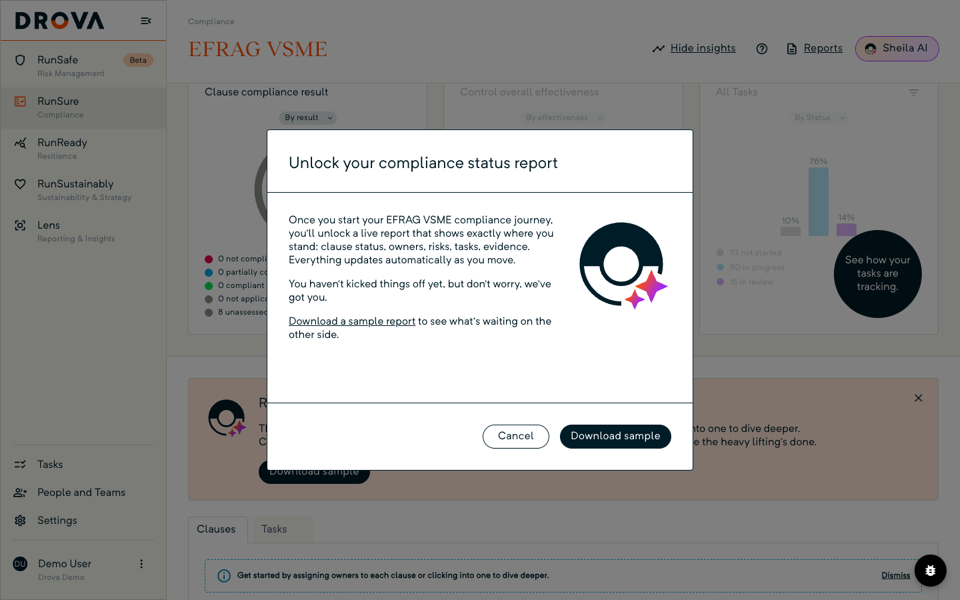
On a framework where no clause has been started yet you will see Unlock your compliance status report instead, with Download sample so you can preview the layout. Keep the dated file with the lodged report; the progress guide covers reading the same statuses on screen.
The disclosure itself is separate. Sheila, Drova's AI assistant, drafts the ASRS S2 Compliance Disclosure from the same menu, and the draft lands in Reporting for your team to review before anything is lodged. The disclosure report guide covers that step.
Tip
Worked example
Illustrative example. A Group 2 food manufacturer with three plants in regional Victoria prepares for limited assurance over its first AASB S2 report. The sustainability lead starts with the governance pillar and attaches the board charter, the minutes of the two meetings where climate risk was discussed and the audit committee's terms of reference to the relevant requirements, each stamped with the date and the person who added it.
In the materiality assessment, the heat-stress risk to the Shepparton plant scores likely and major. The rationale records the site's temperature history and the cost of a production stoppage in a past heatwave, with the engineering report attached under Files. The finance lead uploads the electricity and gas invoices and the calculation behind the Scope 1 and 2 figures.
At period end the team downloads the Materiality Assessment Result and the Compliance Status spreadsheets, dates them, and files both with the lodged report. When the assurance provider asks how the heat-stress score was reached, the answer is already attached. Figures illustrative.
Product guide. Steps and screenshots come from Drova product captures on a demo tenant, checked against the product atlas on 25 September 2026. Not yet reviewed by Customer Success; if a label or step differs from what you see in Drova, use the feedback below.
Frequently asked questions
What counts as evidence for AASB S2 assurance?
Evidence for AASB S2 assurance is anything that lets a reviewer trace a statement to its source: board minutes, policies, the materiality assessment and its rationale, scenario analysis, emissions calculations and the invoices or meter data behind them, and a record of who did what and when.
What is the difference between limited and reasonable assurance?
Limited assurance is the lower level of assurance and applies in the first years of mandatory climate reporting. Reasonable assurance is the higher level, the same level that applies to the financial report, and phases in later under the AUASB's ASSA 5010 timeline. Both look back at the same evidence trail.
Does Drova check whether my evidence is good enough?
No. Drova records the artefact, its type, who added it and when, which is the trail the reviewer follows. Your team decides whether an artefact demonstrates the requirement and sets the compliance result.
Can one document support several requirements?
Yes. Attach the document to each AASB S2 requirement it supports. Each attachment is its own record on that requirement, so a reviewer opening any one of them finds the document without hunting elsewhere.
Where do the rationales for materiality scores live?
The rationales live on each risk, opportunity and impact in RunSustainably, in the Rationale field, with supporting files beside it. The Materiality Assessment Result export carries them all into one spreadsheet.
Is the Compliance Status spreadsheet the same as the disclosure report?
No. Compliance Status is a dated snapshot of where each clause stands, with its linked controls, tasks and evidence, for the audit file. The ASRS S2 Compliance Disclosure is the report itself, drafted by Sheila and reviewed by your team before it is lodged.
Was this article helpful?
Related articles
- Drova help articles
Every product guide, in one place.
- How do you generate an AASB S2 disclosure report in Drova?
The disclosure the evidence trail sits behind.
- How do you export materiality results for your auditors?
The Materiality Assessment Result export, step by step.
- How do you work an AASB S2 clause in Drova?
Requirements, controls, tasks and evidence on one clause.
- How do you assess financial materiality for AASB S2?
Where the rationale on each score is first written.
Still stuck? Contact support.
