Product guide · RunSustainably module · Updated 25 September 2026
How do you export materiality results for your auditors?
A materiality assessment report is the record of every sustainability issue your organisation assessed for AASB S2, how each was scored and why. It matters because AASB S2 assurance tests that process, not only the disclosure, and the Corporations Act requires you to keep the records behind the report. Drova helps by exporting that record from RunSustainably as the Materiality Assessment Result spreadsheet, with a Compass quality report Sheila drafts so your team can close gaps first. This guide covers the steps in Drova to download the spreadsheet, generate the quality report and find it in Reporting.
Short answer
You export materiality results from RunSustainably by opening Reports on the Assessments page and choosing Materiality Assessment Result. That downloads a spreadsheet with every issue's classification, the risks, opportunities and impacts behind it, and their scores, ratings and justifications: the file auditors and assurance reviewers receive. Before you send it, finish the assessment, check that every score carries a rationale, and generate the Compass quality report so Sheila can point out thin spots first.
RunSustainably is the sustainability and materiality module of Drova's RunGood platform. Sheila is the AI assistant in RunGood that drafts the Compass quality report and suggests where the assessment is thin; your team decides what to change. Generated reports land in Reporting, the RunGood surface that lists every report your tenant owns.
- One file, every judgement. The spreadsheet carries each issue's classification, scores, ratings and justifications, so an auditor can trace a verdict back to the person who made it.
- Finish, then export. An issue's classification settles once both its assessments are marked complete; an earlier export is a snapshot of work in progress.
- Quality check first. The Compass report identifies gaps in the assessment work. Fix them, then export again.
Note
Before you start
This guide is for the person preparing the assurance file for the AASB S2 disclosure: a sustainability lead, a finance lead or a risk manager. Have your assessment marked complete, your assurance provider's information request and the draft disclosure to hand.
Generating the disclosure itself is covered in the disclosure report guide, and the wider assurance file the export sits in is covered in the evidence trail guide. If you are not yet sure how far along your AASB S2 programme is, the ASRS readiness assessment gives you a starting position. Other product guides are in the help hub. Account help, sign-in and security settings are covered in the Drova help centre, not here.
How do you get the results ready for your auditors?
- Finish the assessment before you export. Mark both halves of each issue complete so its classification is settled for the reporting period. The financial half is covered in how to assess financial materiality for AASB S2. An export taken mid-assessment is a working snapshot, and the auditor will ask which version is final.
- Check every score has a rationale and a source. Assurance tests the judgement, not just the number. A score with no written reasoning is a gap in the process AASB S2 asks you to disclose.
- Run a quality check and fix what it finds. Read the Compass quality report as a first reviewer would. Where it identifies an issue scored on one side only, or a risk with no justification, complete the record.
- Export the results spreadsheet. Download the Materiality Assessment Result once the fixes are in. It carries every issue's classification, the contributing risks, opportunities and impacts, and their scores, ratings and justifications.
- Date it and keep the previous version. Name the file for the reporting period and the export date, and keep earlier exports so you can show what changed and why.
- Reconcile it to the disclosure and the register. The issues marked material in the spreadsheet should match the climate-related risks and opportunities in your AASB S2 report and your enterprise risk register. Hand over the spreadsheet, the quality report and that reconciliation together.
What the regulator requires
AASB S2 Climate-related Disclosures is the Australian standard for climate-related financial disclosure. It is mandatory for sustainability reports under the Corporations Act 2001 and is operative for periods beginning on or after 1 January 2025. AASB S2 is based on IFRS S2, which requires an entity to disclose the climate-related risks and opportunities that could reasonably be expected to affect its prospects and the processes it uses to identify, assess, prioritise and monitor them.
Financial materiality, under AASB S2, means information about a climate-related risk or opportunity is material if omitting, misstating or obscuring it could reasonably be expected to influence the decisions of the primary users of general purpose financial reports. A materiality assessment is the documented process of identifying, scoring and classifying those issues; its results are the classification of each issue and the reasoning behind it.
Reporting is phased by entity size: Group 1 from annual periods beginning on or after 1 January 2025, Group 2 from 1 July 2026 and Group 3 from 1 July 2027, with the thresholds set out in ASIC Regulatory Guide 280. Work out your group on the applicability page. The disclosures the assessment feeds are on the AASB S2 disclosures checklist.
Sustainability assurance is the independent review or audit of the sustainability report by an auditor. Under the AUASB's ASSA 5010 timeline it phases in from limited to reasonable assurance, and the AUASB's key messages for preparers say entities should have appropriate processes and records to support the information in their report.
Sustainability records are the documents and working papers that explain the methods, assumptions and evidence behind the sustainability report. RG 280 notes that the Corporations Act requires reporting entities to keep them for seven years. The exported assessment, with a rationale for every score, is that record for the materiality work.
A Group 3 entity that concludes it has no material financial risks or opportunities relating to climate may instead lodge a statement to that effect, with an explanation of how it reached that conclusion, under section 296B of the Corporations Act. The exported assessment is the record of how it got there.
In Drova
Download the results spreadsheet
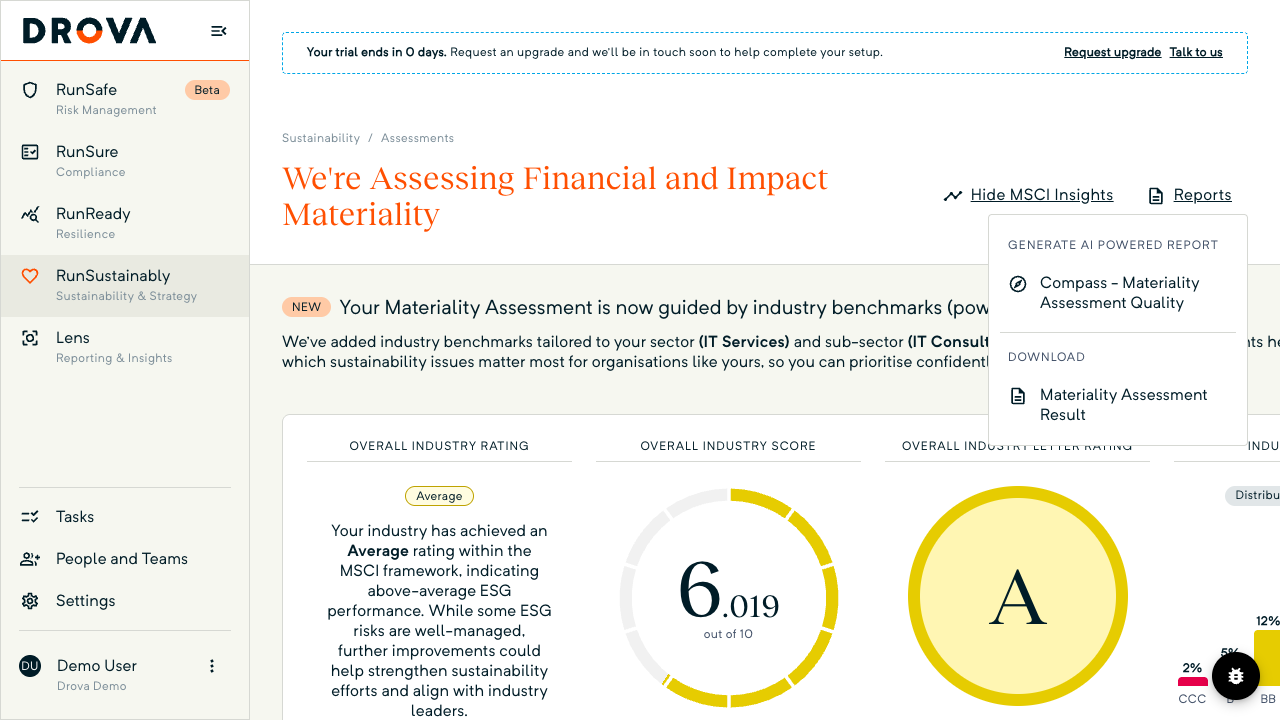
Open RunSustainably, then Assessments. In the header above the Potential ESG issues list, choose Reports. The dropdown has two groups: Generate AI Powered Report, which holds Compass - Materiality Assessment Quality, and Download, which holds Materiality Assessment Result. Choose Materiality Assessment Result.
The Reports button greys out while the file is prepared, then the spreadsheet downloads through your browser. It carries every issue's classification, the risks, opportunities and impacts behind it, their scores and ratings, the justifications, and how they roll up to the verdict. This is the file auditors and assurance reviewers receive, so treat it as the source of truth for the assessment.
In Drova
Generate the Compass quality report
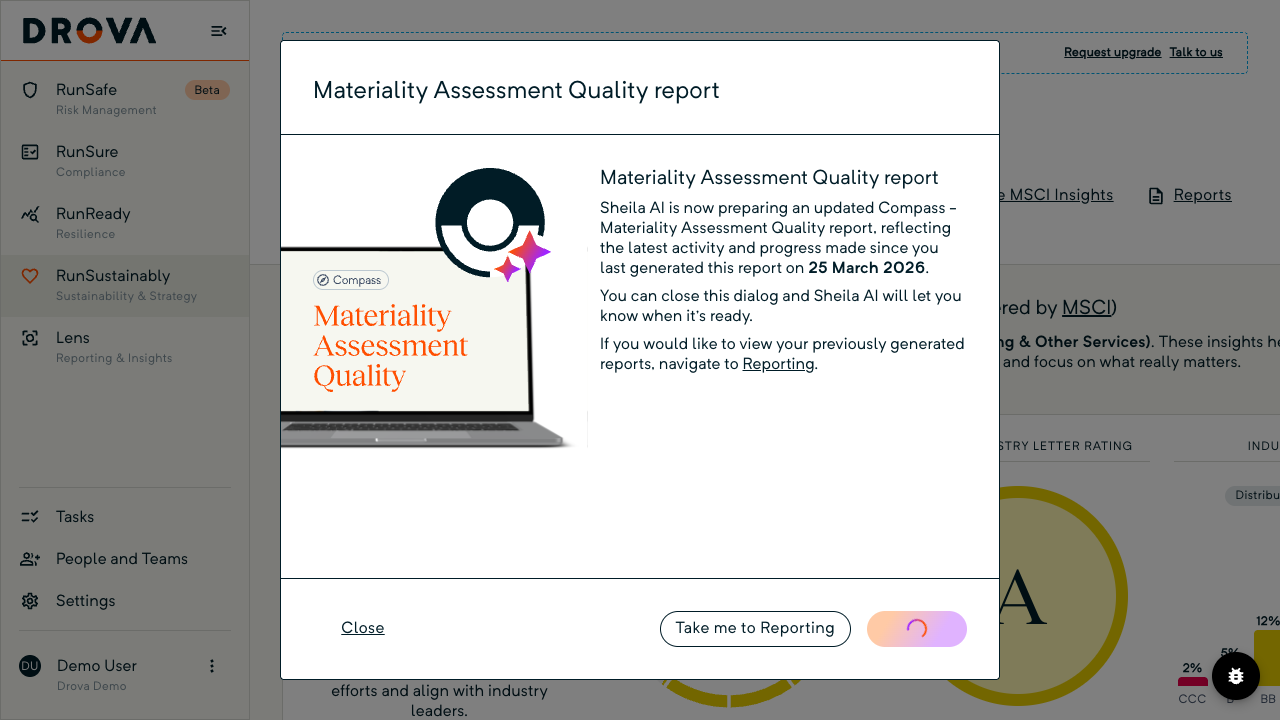
From the same Reports dropdown, choose Compass - Materiality Assessment Quality. The item is locked while a report is already generating. The Materiality Assessment Quality report dialog opens.
Sheila generates a narrative that identifies how complete and coherent the assessment is: whether each issue is scored, whether risks, opportunities and impacts are linked to it, and whether the matrix has the data behind it. If you have generated the report before, the dialog says the new one reflects activity since that date; on a first run it offers Download sample while you wait.
Generation runs in the background. Choose Close and Sheila lets you know when it is ready, or Take me to Reporting. Your team reads it and decides what to fix.
In Drova
Find the report in Reporting
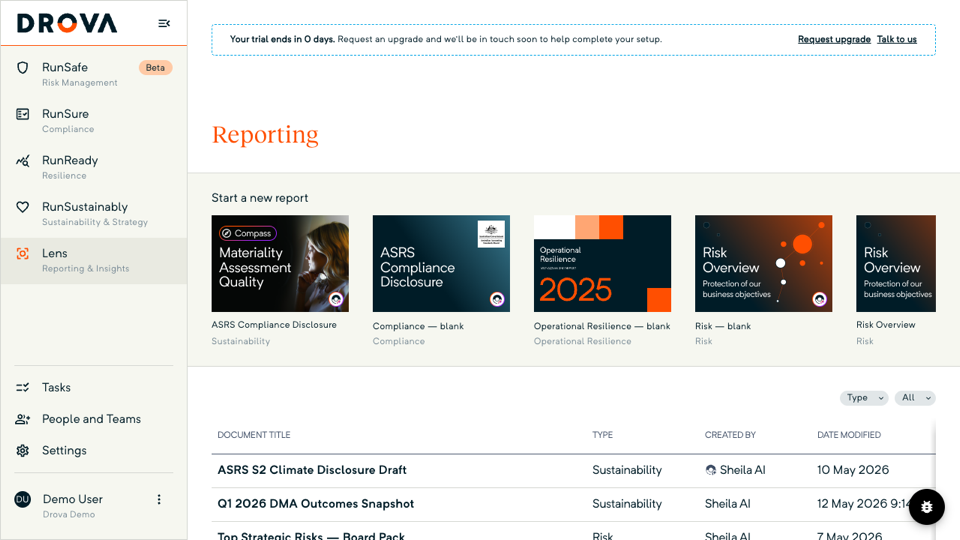
Open Reporting. The list shows every report your tenant owns, with the document title, type, creator and date modified in four columns. A generated Compass report appears with Sheila AI as the creator, showing the time as well as the date it was modified.
Use the Type and All filters to narrow the list by report type or creator. Open the row menu to Preview the report or Download the PDF for your assurance file. Earlier Compass reports stay in the list, so you can show an auditor how the assessment improved between runs. Keep the spreadsheet beside the PDF in the same file, with the date of each.
Tip
Worked example
A Group 2 building materials manufacturer with three plants in regional New South Wales has 14 issues on its list, four of them climate-related. Carbon emissions and climate change vulnerability come out material; the other two are recorded and left below the line. The sustainability lead generates the Compass quality report before exporting.
It identifies one climate issue assessed on the financial side only and two risks with no justification written. She completes the impact side, adds the two rationales, then downloads the Materiality Assessment Result and names it for the financial year and the export date.
The auditor receives that spreadsheet, the quality report PDF from Reporting, and a one-page reconciliation showing that the two material issues match the two climate risks in the enterprise risk register and the draft disclosure. The earlier export stays in the file so the change is visible. Figures are illustrative. How the assessment, the register and the disclosure fit together in Drova is on the AASB S2 solution page.
Product guide. Steps and screenshots come from Drova product captures on a demo tenant, checked against the product atlas on 25 September 2026. Not yet reviewed by Customer Success; if a label or step differs from what you see in Drova, use the feedback below.
Frequently asked questions
What is in the Materiality Assessment Result spreadsheet?
The Materiality Assessment Result spreadsheet from RunSustainably holds every issue's classification, the risks, opportunities and impacts behind it, their scores, ratings and justifications, and how those roll up to the verdict. It is the file auditors and assurance reviewers receive.
Is the spreadsheet enough evidence on its own?
No. The Materiality Assessment Result spreadsheet evidences the assessment process. The disclosure, the risk register, board records and the scenario analysis are separate evidence. Pair the spreadsheet with the Compass quality report and a reconciliation to the disclosure.
What does the Compass quality report do?
The Compass quality report is a narrative Sheila drafts in Drova that identifies how complete and coherent the materiality assessment is: whether issues are scored, whether risks, opportunities and impacts are linked, and whether the matrix has the data behind it. Your team decides what to change.
Can I export before the assessment is complete?
Yes, as a working snapshot. For the assurance file, finish first: an issue's combined classification only settles once both its financial and impact assessments are marked complete.
Does the export include impact materiality as well?
Yes. The Materiality Assessment Result spreadsheet carries both the financial and the impact half of each issue. AASB S2 requires the financial view only, so that is what your auditor tests for the climate disclosure. The impact half matters if you also report under a double materiality regime.
Was this article helpful?
Related articles
- Drova help articles
Every product guide, in one place.
- How do you build an evidence trail for AASB S2 assurance?
The wider assurance file the export sits in.
- How do you read your materiality matrix and results?
What the classifications in the export mean.
- How do you assess financial materiality for AASB S2?
The assessment the export records.
- How do you generate an AASB S2 disclosure report in Drova?
From an active framework to a downloadable disclosure.
Still stuck? Contact support.
