Product guide · RunSustainably module · Updated 25 September 2026
How do you read your materiality matrix and results?
A materiality matrix plots every assessed sustainability issue by how much it could affect your finances and how much your business affects people and the environment through it. It matters because the financial axis decides which climate issues belong in your AASB S2 disclosure. This guide explains how to read the matrix and the results behind it, then shows where each result comes from in RunSustainably, the sustainability and materiality module of Drova's RunGood platform, from the issue pages to the Overview.
Short answer
A materiality matrix plots every assessed sustainability issue on two axes: how much the issue could affect your finances, and how much your business affects people and the environment through it. High on both axes is double material, high on one is financial or impact material, low on both is not material. Read it from the top right, then trace each dot back to the rated risk, opportunity or impact that put it there. For AASB S2 the financial axis is the one that counts, since it applies the financial reporting materiality test.
- Two axes, four results. Financial materiality on one axis, impact materiality on the other, and every issue lands in one of four quadrants.
- The highest rating wins. Each half of an issue's position reads its highest-rated completed risk, opportunity or impact, not an average.
- Unfinished issues are invisible. An issue does not reach the matrix until both halves are assessed, so check the not completed count first.
Note
Before you start
This guide is for the person reading or presenting materiality results: a sustainability lead, a finance lead or a risk manager. Have your issue list and the completed assessments to hand. Scoring is covered in its own guides: assessing financial materiality, assessing climate-related opportunities and adding climate issues to the assessment. If you are not yet sure how far along your AASB S2 preparation is, the ASRS readiness assessment gives you a starting point. Account help, sign-in and security settings are covered in the Drova help centre, not here.
How do you read a materiality matrix?
- Find the two axes. One axis is financial materiality: could the issue affect your cash flows, access to finance or cost of capital. The other is impact materiality: does your business affect people and the environment through the issue. Each dot is one issue.
- Read the top right first. Issues high on both axes are double material and need the fullest treatment. Then read the one-sided quadrants, and treat the bottom left as set aside for this cycle, with the reason documented.
- Know which axis AASB S2 reads. AASB S2 applies the same materiality test as financial reporting, so the financial axis decides what goes into your climate disclosure. The impact axis is the other half of a double materiality assessment: it decides whether an issue is impact material or double material on the matrix.
- Trace every dot back to its evidence. A dot's position comes from the highest-rated completed risk, opportunity or impact on that issue. Open the issue and check the rating, the rationale and the file behind it before you quote the result.
- Count what is missing. An issue not yet assessed on both sides is not on the matrix at all. Check the not completed count against your issue list before the picture goes to the board.
- Lock and date the picture. Results move whenever scoring changes. Mark the assessments complete for the reporting period and export the results, so the report and the assurance file show the same matrix.
What the regulator requires
AASB S2 Climate-related Disclosures is the Australian Sustainability Reporting Standard for climate-related financial disclosures, issued by the Australian Accounting Standards Board in September 2024. It requires you to disclose the climate-related risks and opportunities that could reasonably be expected to affect your prospects, and to explain the process you use to identify, assess, prioritise and monitor them. It applies the same materiality test as financial reporting: AASB S2 says information is material if omitting, misstating or obscuring it could reasonably be expected to influence the decisions of the primary users of general purpose financial reports.
That test is the financial axis of the matrix, and both risks and opportunities count. Reporting is phased under the Corporations Act 2001: Group 1 from annual periods beginning on or after 1 January 2025, Group 2 from 1 July 2026 and Group 3 from 1 July 2027, with the size thresholds for each group set out in ASIC Regulatory Guide 280. Work out your group on the applicability page.
The matrix is a summary, not a disclosure. What you disclose about each material issue, clause by clause, is in the AASB S2 disclosures checklist.
In Drova
Read the financial half of an issue
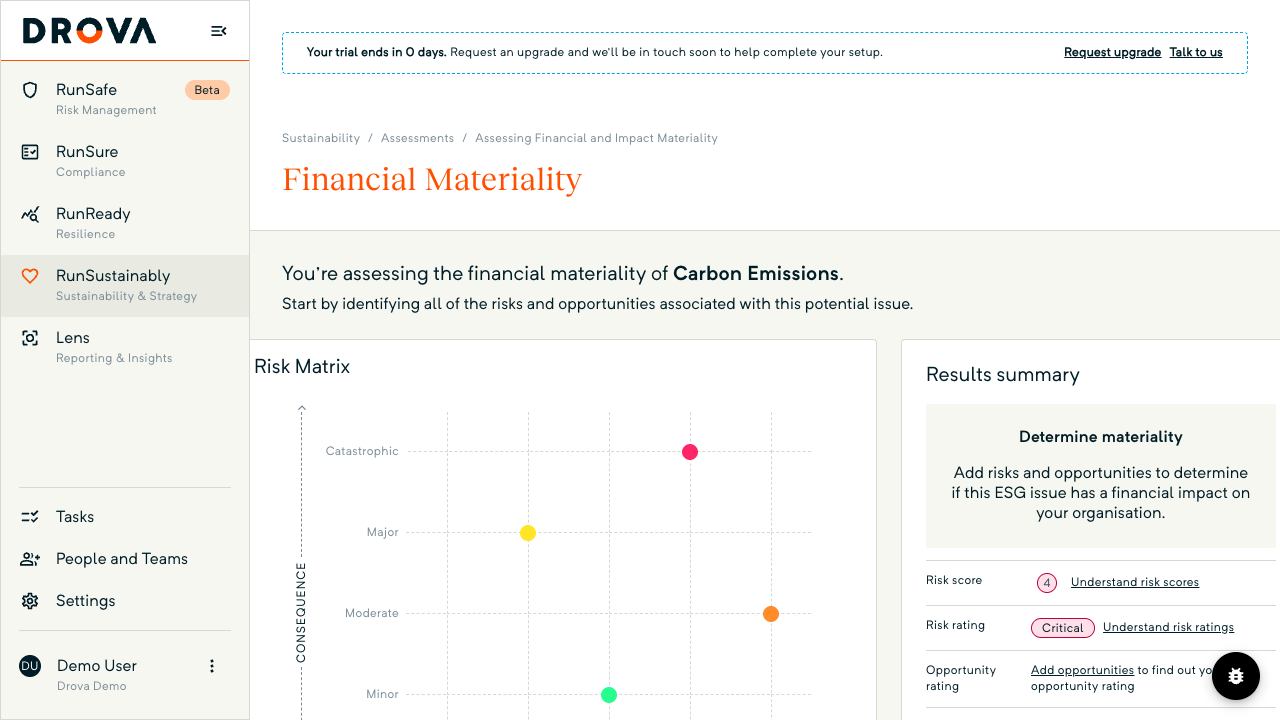
Open RunSustainably, then Assessments, open the issue and choose Financial Materiality. The Risk Matrix plots every completed risk by likelihood and consequence. The Results summary shows Risk score, Risk rating and Opportunity rating, each taken from the highest-rated completed risk or opportunity.
The issue is material on this side when a completed risk is rated Significant or Critical, or a completed opportunity is rated Medium or High. A risk rated Important does not flip the verdict on its own. Only items at Complete count, and editing one sends it back to In Progress.
In Drova
Read the impact half and the human rights flag
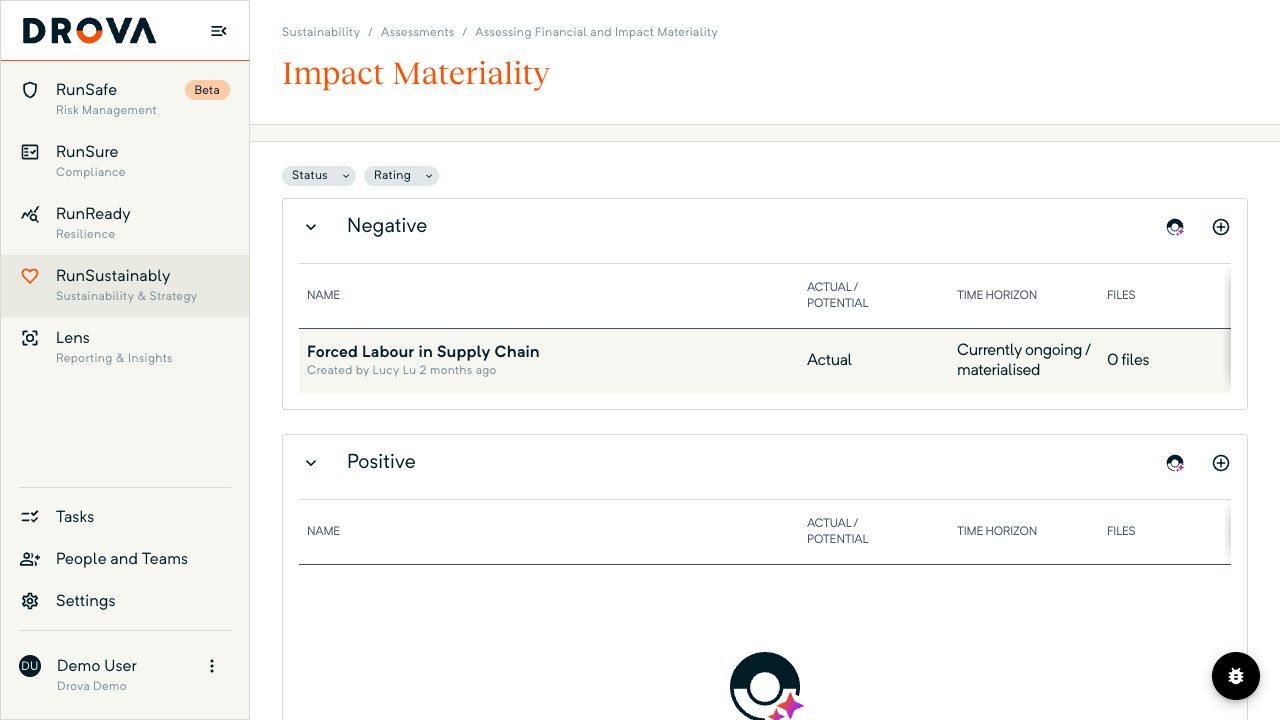
Choose Impact Materiality on the same issue. Impacts sit in two lists, Negative and Positive, with Actual / Potential, Time Horizon, Impact Score, Rating and Status columns. The Results summary shows Impact score, Impact rating and a Human rights row.
The issue is material here when a completed impact is rated Important, Significant or Critical, a lower bar than the financial side. One rule sits above the scores: a completed negative impact marked Yes, it does on human rights makes the issue material whatever its score. Sheila can suggest impacts through Add Impacts with Sheila; your team scores and decides.
In Drova
Read the matrix and the progress counters
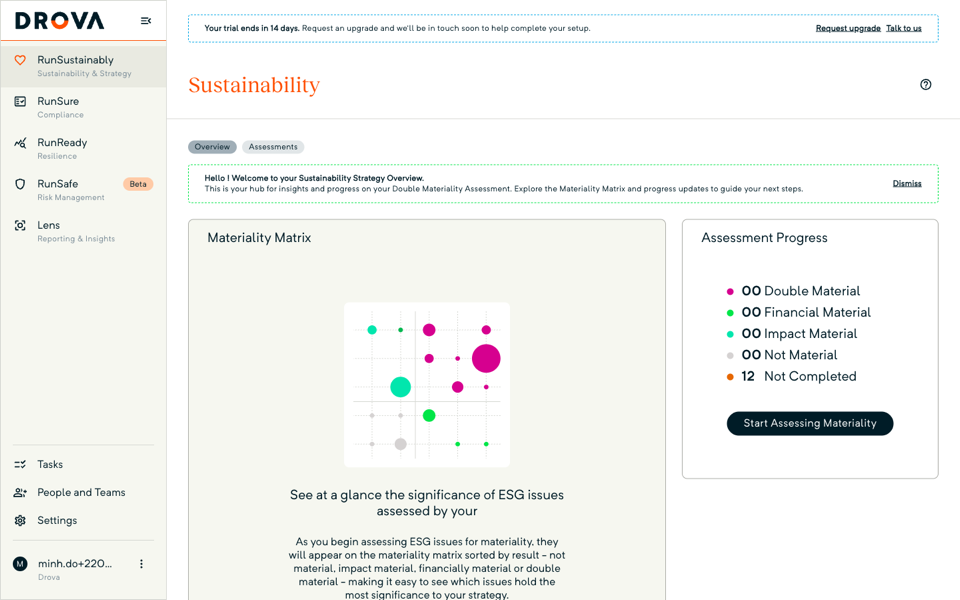
Open the Overview tab. The Materiality Matrix card plots each fully assessed issue with its financial rating across the bottom and its impact rating up the side, coloured by result. The Assessment Progress card counts issues as Double Material, Financial Material, Impact Material, Not Material or Not Completed.
An issue only leaves Not Completed and lands on the matrix once both its assessments are marked complete, so a high count there means the picture is not finished. Start Assessing Materiality returns you to the issue list. For AASB S2, the issues counted as Financial Material or Double Material are the ones material on the financial axis.
Tip
Worked example
A Group 2 agribusiness growing grain and cotton assesses twelve issues. On the Overview the counters read three double material, two financial material, one impact material, four not material and two not completed, so ten issues are on the matrix. Water availability sits top right: a completed risk rated Critical, because a dry year cuts irrigated yield, and a completed negative impact rated Significant for drawdown on a shared aquifer.
Carbon pricing on fuel and fertiliser sits on the financial axis only, with a risk rated Significant and an opportunity rated Medium for lower-emission fertiliser contracts. Labour conditions in seasonal harvest crews sits on the impact axis only, made material by the human rights flag on one completed negative impact rather than its score.
Packaging waste and biodiversity still have impacts in review, so the sustainability lead finishes those before the board sees the matrix, then carries the financially material issues into the AASB S2 disclosure report. Figures are illustrative. For how the module fits the wider disclosure, see Drova for AASB S2.
Product guide. Steps and screenshots come from Drova product captures on a demo tenant, checked against the product atlas on 25 September 2026. Not yet reviewed by Customer Success; if a label or step differs from what you see in Drova, use the feedback below.
Frequently asked questions
What is a materiality matrix?
A materiality matrix is a chart that plots each sustainability issue on two axes: financial materiality, meaning whether the issue could affect your finances, and impact materiality, meaning whether your business affects people or the environment through it. An issue that is material on both axes is double material.
Does AASB S2 require double materiality?
No. AASB S2 applies the same materiality test as financial reporting, so the financial axis decides what goes into your climate disclosure. The impact axis is still worth keeping: it is what makes an issue impact material or double material on the matrix, and it is where human rights impacts surface.
Why is an issue missing from the matrix?
In Drova an issue only appears once both its assessments are marked complete; until then it is counted as Not Completed. Editing a completed risk, opportunity or impact also sends that item back to In Progress until it is marked Complete again.
Is the matrix position an average of everything scored on an issue?
No. Each half reads the highest-rated completed item that triggers materiality: on the financial side a risk rated Significant or Critical, or an opportunity rated Medium or High; on the impact side an impact rated Important or above, or a negative impact that affects human rights.
Can I export the results behind the matrix for my auditor?
Yes. On the issue list, open Reports and choose Materiality Assessment Result. The spreadsheet lists every issue's result, the risks, opportunities and impacts behind it, their scores and ratings, and the rationale for each. The steps are in export materiality results for your auditors.
Was this article helpful?
Related articles
- Drova help articles
Every product guide, in one place.
- How do you assess financial materiality for AASB S2?
Where the financial axis of the matrix is scored.
- How do you add climate issues to your materiality assessment?
Get the right issues onto the matrix in the first place.
- How do you export materiality results for your auditors?
Take the results behind the matrix into the assurance file.
- How do you assess climate-related opportunities for AASB S2?
Opportunities count towards the financial verdict too.
Still stuck? Contact support.
