Product guide · RunSustainably module · Updated 25 September 2026
How do you add climate issues to your materiality assessment?
A materiality assessment is the process of deciding which sustainability issues, and the climate-related risks and opportunities under them, matter enough to assess and disclose. It matters because AASB S2 requires you to disclose the climate-related risks and opportunities that could reasonably be expected to affect your prospects, and the issue list is where that work starts. Drova helps by seeding the list from your industry in RunSustainably, then letting your team add issues from MSCI benchmarks, the issue library or your own wording, and remove the ones that do not apply.
This guide covers how to choose those issues and the steps in Drova to add them.
Short answer
You add climate issues to a materiality assessment by starting from a recognised issue list for your industry, keeping the issues that describe how climate could affect your business, and adding the physical and transition issues that list misses. Each issue should be a named exposure, such as carbon emissions or flood exposure at a site, rather than a theme. AASB S2 covers risks and opportunities, so the list needs both. In Drova the list is seeded from your industry, guided by MSCI benchmarks, and your team adds or removes issues from there.
AASB S2 Climate-related Disclosures is the Australian standard for climate-related financial disclosures, made by the Australian Accounting Standards Board and mandatory for entities in the Corporations Act sustainability reporting regime. Climate-related physical risks come from climate change itself, either event-driven, such as storms, floods, drought or heatwaves, or from longer-term shifts such as reduced water availability. Climate-related transition risks arise from the move to a lower-carbon economy: policy, legal, technological, market and reputational risks such as a carbon price or a change in customer demand.
RunSustainably is the sustainability and materiality module of Drova's RunGood platform, and the issue list lives there. Sheila, Drova's AI assistant, drafts and suggests once the list exists; the list itself is your team's call.
- Start from your industry. Industry benchmarks show which issues your peers treat as material. Look at the benchmarks first, not only at the benchmarks.
- Issues first, risks second. An issue is the topic; the risks and opportunities under it are scored later in the financial materiality assessment.
- Curate, do not collect. Every issue on the list is one you will assess and, if material, disclose, so remove what does not apply and note why.
Note
Before you start
This guide is for the person preparing or reviewing the AASB S2 disclosure: a sustainability lead, a finance lead or a risk manager. Have your industry classification, last year's financial report and any earlier climate risk work to hand. If you have not yet checked where your organisation stands against the standard, the ASRS readiness assessment gives you that starting point.
The issue list is created during first-time AASB S2 setup. Scoring the risks and opportunities under each issue is covered in the financial materiality guide. Account help, sign-in and security settings are covered in the Drova help centre, not here.
How do you choose which climate issues to assess?
- Start from a recognised issue list for your industry. Industry benchmark data, such as the MSCI key issues for your sub-industry, shows where peers concentrate their effort. The benchmark is a starting point, not the answer.
- Keep the climate issues that describe a real exposure. Carbon emissions, climate change vulnerability and opportunities in clean technology are the usual candidates. Keep an issue if you can name the part of the business it touches.
- Add the physical and transition issues the list misses. Flood or heat at a site, a carbon price on your fleet, a customer that now asks for emissions data. AASB S2 covers opportunities too, so add the upside; how each opportunity is then scored is in the opportunities guide.
- Write each issue so it can be assessed. One line on what the issue is and why it might matter to you. An issue that reads like a slogan cannot be scored.
- Remove what does not apply, and record why. A short note against each removed issue shows the process was deliberate. The AUASB's key messages for preparers ask for processes and records that support the sustainability report, and that note is part of the record; the evidence trail guide covers where the rest of it lives.
- Assign an owner and hand the list over to assessment. Each issue then goes into financial materiality assessment, where its risks and opportunities are scored on likelihood and consequence. Assigning owners and tasks is covered in its own guide.
What the regulator requires
AASB S2 Climate-related Disclosures requires you to disclose the climate-related risks and opportunities that could reasonably be expected to affect your prospects, and the processes you use to identify, assess, prioritise and monitor them, including whether and how those processes are integrated into your overall risk management. The standard applies the same materiality test as financial reporting: information is material if omitting, misstating or obscuring it could reasonably be expected to influence the decisions of the primary users of general purpose financial reports.
Financial materiality, in AASB S2 terms, is whether a climate-related risk or opportunity could reasonably be expected to affect your cash flows, your access to finance or your cost of capital over the short, medium or long term. That is the test each issue on your list will face once its risks and opportunities are scored.
Reporting is phased under the Corporations Act 2001: Group 1 from annual periods beginning on or after 1 January 2025, Group 2 from 1 July 2026 and Group 3 from 1 July 2027, with the thresholds for each group set out in ASIC Regulatory Guide 280. Work out your group on the applicability page. The disclosures the list feeds, clause by clause, are in the AASB S2 disclosures checklist.
A Group 3 entity that concludes it has no material financial risks or opportunities relating to climate may lodge a statement to that effect under section 296B of the Corporations Act instead of full climate disclosures, together with a statement explaining how it reached that conclusion. The issue list, with a note of what was removed and why, is part of the record of how that conclusion was reached.
In Drova
Start from the seeded list and the MSCI priorities
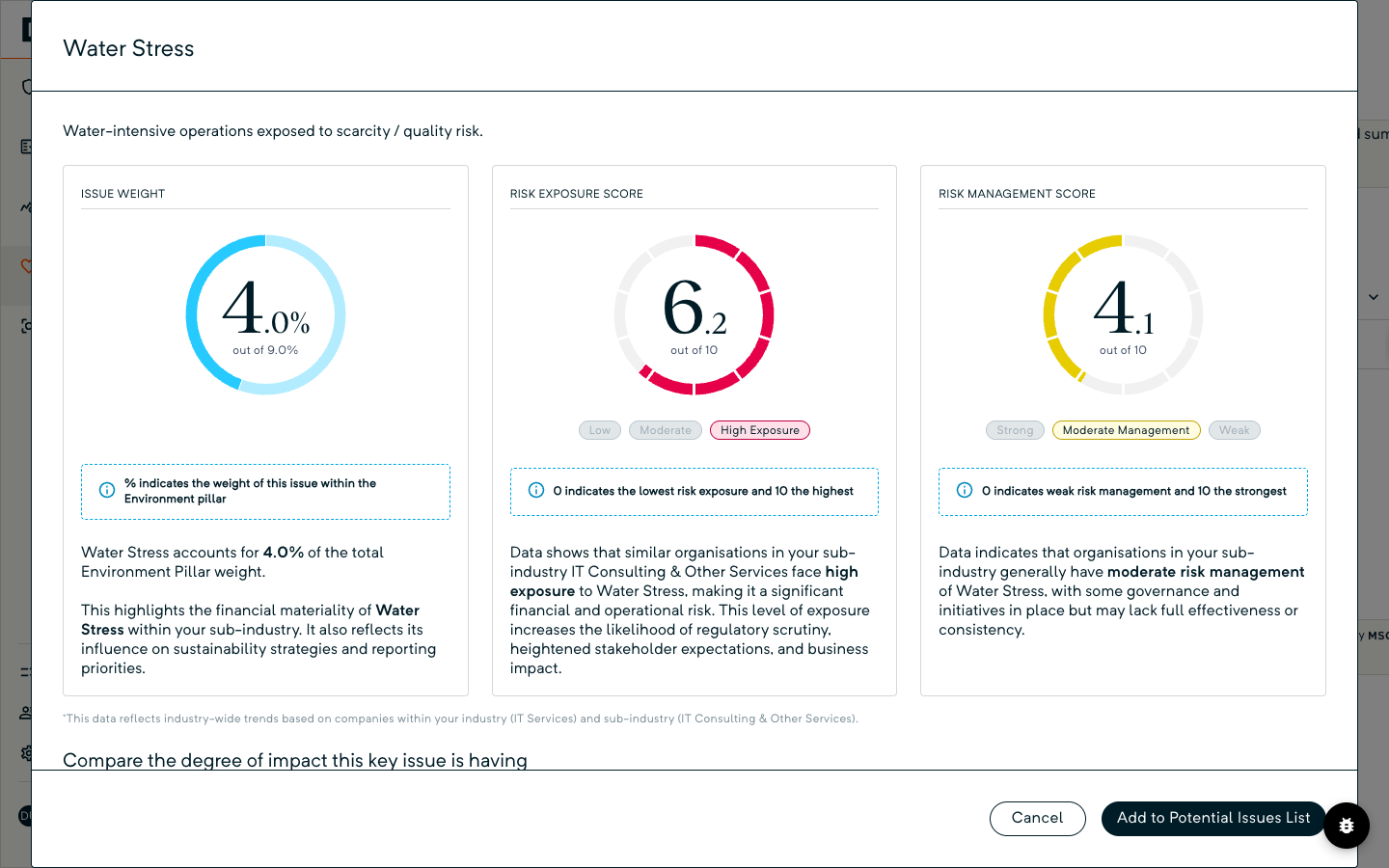
Open RunSustainably, then Assessments. The page We're Assessing Financial and Impact Materiality carries your Potential ESG issues list, seeded from your industry at setup. Above the list, the MSCI insights panel shows three pillar cards, Environmental, Social and Governance, each listing the High Priority issues already in your assessment with a weight against each; the Environmental and Social cards also list Moderate Priority issues to consider.
Click a row to open the issue. Environmental and social issues show their Issue Weight, Risk Exposure Score and Risk Management Score for your sub-industry; governance issues show the weight only. Choose Add to Potential Issues List; once added, the button reads Added to Potential Issues List. The benchmarks are advisory; your team decides what stays.
Hide MSCI Insights in the page header collapses the panel. If the panel is open but blank, your organisation's industry classification has not been set yet; ask your Drova administrator to set it and the benchmarks appear.
In Drova
Add an issue from the library
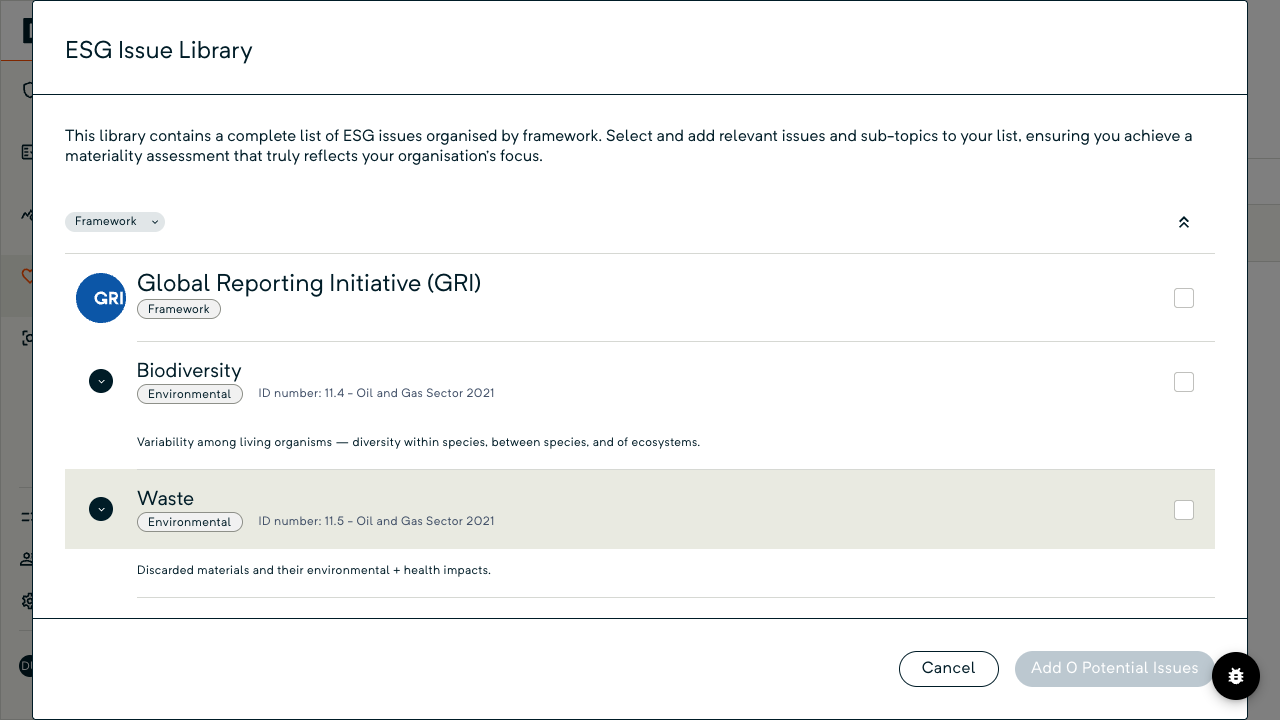
Choose Add ESG Issue in the page header, or open the plus menu on the list and, under Add, pick ESG Issue From Library. The ESG Issue Library dialog lists issues organised by framework, each with its pillar and the framework's own ID number. Use the Framework filter to narrow the list, expand a framework and tick the issues or sub-topics you want; ticking a parent ticks its children. Issues already on your list show as ticked and greyed, so they cannot be added twice.
The button reads Add 0 Potential Issues until you tick something, then counts up. Choose that button, and the new rows appear on your list, each with Financial Materiality and Impact Materiality rows marked Not Started.
In Drova
Write your own issue, or remove one
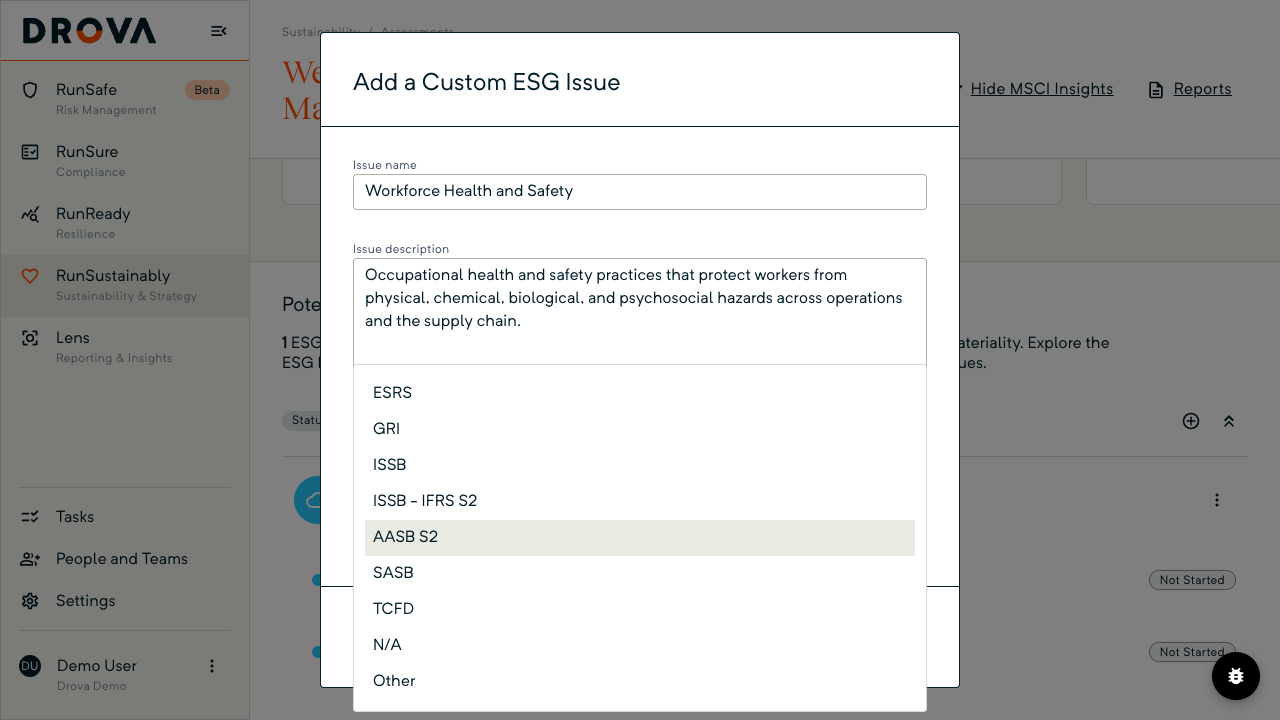
If the library does not have the climate issue you need, open the plus menu and, under Add, pick Custom ESG Issue. In Add a Custom ESG Issue, choose Environmental from the three category buttons for a climate issue, fill in Issue name and Issue description, and choose AASB S2 from the Framework list so the issue is tagged to the standard. ID Number is optional. Save and Close enables once the required fields are filled.
To take an issue off the list, open its row menu and choose Remove ESG Issue. The confirmation warns that all assessment progress on the issue will be lost, and Remove Issue and Delete Progress only enables after you tick the confirmation. Only custom issues can be edited.
Tip
Worked example
A Group 2 fruit grower and exporter in Victoria's Goulburn Valley opens its seeded list and finds 12 issues, three of them climate-related: carbon emissions, climate change vulnerability and water stress. The sustainability lead keeps all three. From the moderate priority table she adds opportunities in clean tech, because on-farm solar and electrified cool stores are already on the capital plan.
Two issues are missing, so she writes them as custom issues tagged AASB S2: heat exposure across the harvest workforce, a physical risk, and cold-chain freight emissions to export markets, a transition risk that customers have started asking about. She removes responsible investment with a one-line note that the business holds no investment portfolio. The list settles at 14 issues, five of them climate, each with an owner, and moves into financial materiality assessment. Figures and priorities are illustrative.
How the issue list connects to the rest of the AASB S2 work in Drova, from scoring through to the disclosure report, is on the AASB S2 solution page.
Product guide. Steps and screenshots come from Drova product captures on a demo tenant, checked against the product atlas on 25 September 2026. Not yet reviewed by Customer Success; if a label or step differs from what you see in Drova, use the feedback below.
Frequently asked questions
What is the difference between an issue and a risk?
An issue is the topic, such as carbon emissions or flood exposure. The risks and opportunities are the specific ways that topic could affect your business, scored under the issue in the financial materiality assessment.
Does AASB S2 tell you which climate issues to assess?
No. AASB S2 requires you to disclose the climate-related risks and opportunities that could reasonably be expected to affect your prospects, and the process you used to identify them. Benchmarks and libraries help you build the list; the judgement is yours.
Do the MSCI priorities decide what is material?
No. The MSCI priorities show which issues carry the most weight for your sub-industry and how exposed peers are, so you know where to look first. Materiality comes from your own assessment of each risk and opportunity.
Can you rename an issue added from the library?
No. Library issues keep their framework wording; only custom issues can be edited. If the wording does not fit, write the issue as a custom issue in your own words.
What happens to your work when you remove an issue?
All progress on assessing that issue is deleted, which is why you tick a confirmation before the remove button enables. A library issue can be added again later, but its assessment starts from scratch. Record the reason for the removal; it is part of the process AASB S2 asks you to disclose.
Was this article helpful?
Related articles
- Drova help articles
Every product guide, in one place.
- How do you assess financial materiality for AASB S2?
Score the risks and opportunities under each issue on your list.
- How do you set up AASB S2 in Drova for the first time?
The setup that seeds your issue list in the first place.
- How do you use Sheila to identify climate risks for AASB S2?
Sheila drafts candidate risks under a climate issue; your team decides.
- How do you assess climate-related opportunities for AASB S2?
The upside beside each risk, which AASB S2 also asks for.
Still stuck? Contact support.
