Product guide · RunSustainably module · Updated 25 September 2026
How do you use Sheila to identify climate risks for AASB S2?
AI climate risk identification is the use of an AI assistant to draft the climate-related risks an issue poses to your business, for your team to test and score. It matters because AASB S2 asks you to disclose those risks and the process you used to find them. Drova helps by having Sheila, its AI assistant, draft candidate risks on a climate issue in RunSustainably so your team can review, score and keep or discard each one. This guide covers how to use an AI draft without letting it decide for you, then the steps in Drova.
Short answer
In Drova, Sheila drafts candidate climate risks for an issue in your materiality assessment, tailored to the issue and your organisation. Sheila is Drova's AI assistant: it drafts and suggests, and the people who know the business decide. Your team reads each draft as a claim to test: keep what describes your business, rewrite what is close, delete the rest, then score what remains with a written rationale.
AASB S2 requires you to disclose the process used to identify, assess, prioritise and monitor climate-related risks, so that review is part of the disclosure.
- Drafts, not decisions. A drafted risk becomes yours once someone has read it, agreed it applies and scored it.
- The review is the process you disclose. How you tested the drafts and what you discarded is what the risk management pillar asks you to describe.
- The score is yours. Sheila fills in the name, description and rationale. Likelihood, consequence, value chain and time horizon are left to your team, and the rating follows from what you set.
Note
Before you start
This guide is for the person running the climate side of the materiality assessment: a sustainability lead, a risk manager or a finance lead. Have the climate issues already in your assessment, your risk matrix and knowledge of your sites, suppliers and key contracts to hand; that knowledge is what you test the drafts against.
RunSustainably is the sustainability and materiality module of Drova's RunGood platform, and it holds the materiality assessment this guide works in. Adding climate issues, assessing opportunities and the scoring method in depth each have their own guide. If you have not yet gauged how far along your AASB S2 preparation is, the ASRS readiness assessment gives you a baseline first. Account help, sign-in and security settings are covered in the Drova help centre, not here.
How do you identify climate risks with AI and keep them defensible?
- Frame the issue before you ask. AI drafts against the issue you give it, so start from a climate issue already in your assessment, named the way your business talks about it: extreme heat, flood exposure, carbon pricing. A vague issue gets a vague draft.
- Read each draft as a claim to test. Ask of each: does this event happen to us, through which part of the business, and over which time horizon. If you cannot answer all three, the draft is not ready to keep.
- Keep, rewrite or delete. Keep the drafts that describe your business, rewrite the ones that are close but generic, delete the rest. A risk you cannot explain to an assurance provider in your own words is not yours yet, whoever drafted it.
- Add what the draft missed. AI does not know about the substation next to your depot or the emissions clause in your largest contract. Add those yourself, and note the opportunity beside a risk where one exists, because AASB S2 covers both.
- Score what you keep and write the rationale. Use the likelihood and consequence scale your risk register already uses, set the time horizon, and record why the score is what it is. AASB S2 asks you to explain how you define short, medium and long term and how those definitions link to your strategic planning horizons.
- Document the process, then take material risks onward. Record that AI drafted, who reviewed, and what was discarded and why. That record is what the risk management pillar asks you to disclose, and it belongs in your evidence trail. Material risks then go into your enterprise risk register in RunSafe, Drova's risk and controls module, with an owner.
What the regulator requires
AASB S2 Climate-related Disclosures is the Australian Sustainability Reporting Standard for climate, issued by the Australian Accounting Standards Board and applied under the Corporations Act 2001. It requires you to disclose the climate-related risks and opportunities that could reasonably be expected to affect your cash flows, access to finance or cost of capital, and the processes used to identify, assess, prioritise and monitor them, including how those processes are integrated into overall risk management.
The standard does not prescribe how you find the risks, only that you say how you did, so an AI draft needs a documented review behind it.
A climate-related risk is either a physical risk, from climate events such as storms, floods, drought or heatwaves or from longer-term shifts in climate, or a transition risk, arising from the move to a lower-carbon economy through policy, legal, technology, market or reputation change.
Financial materiality is the test used in financial reporting: information is material if omitting, misstating or obscuring it could reasonably be expected to influence the decisions of the primary users of your report. Both risks and opportunities are in scope, over short, medium and long term horizons that you define and link to the planning horizons you use for strategic decisions.
AASB S2 is based on IFRS S2, the ISSB's climate standard, so its four pillars of governance, strategy, risk management, and metrics and targets are the same. Reporting is phased under the Corporations Act 2001 across three groups from 1 January 2025, with the thresholds set out in ASIC Regulatory Guide 280. Confirm your group on the applicability page. The disclosures your identified risks feed are listed on the AASB S2 disclosures checklist.
In Drova
Ask Sheila to draft risks on the issue
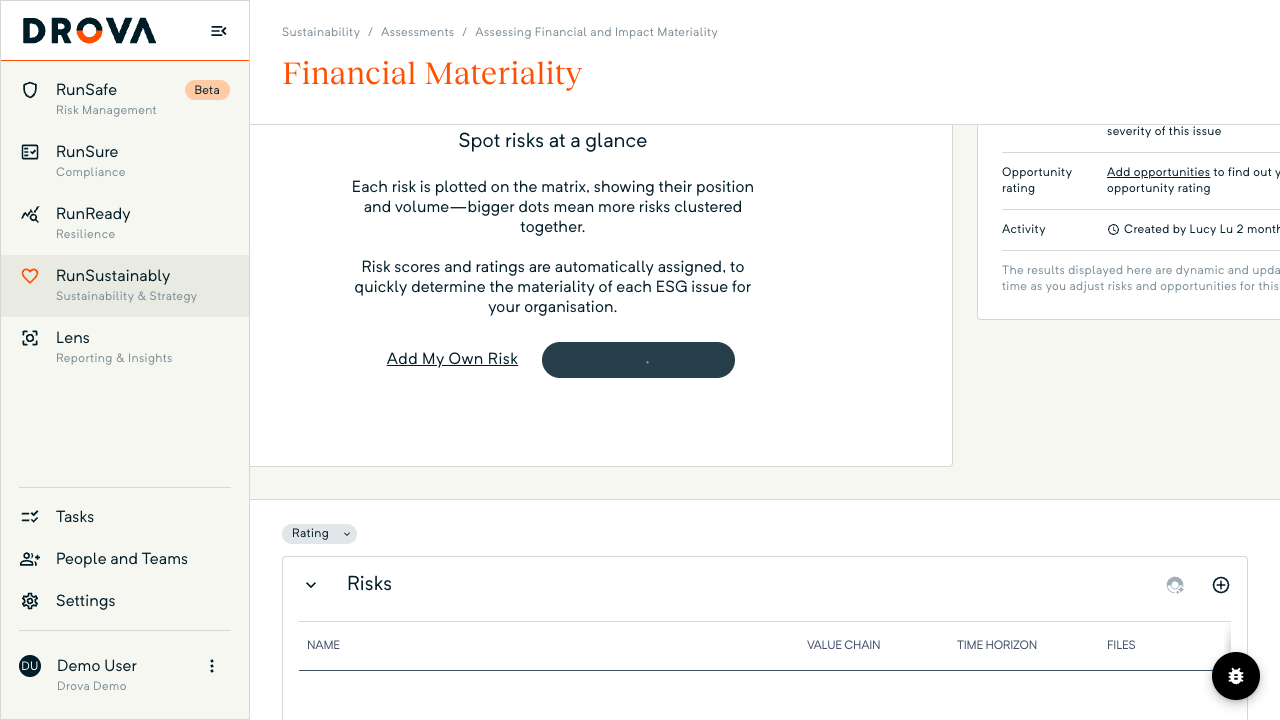
Open RunSustainably, then Assessments, open the climate issue and go to Financial Materiality. On the Spot risks at a glance card choose Add Risks with Sheila. The same button sits in the Risks section while it is empty, with Add My Own Risk beside it.
While Sheila works, the button shows a loading spinner and the add buttons are disabled. Stay on the page: leaving it mid-run cancels the generation. Sheila drafts risks only here. Opportunities have their own button, Add Opportunities with Sheila, further down in the Opportunities section.
In Drova
Review what Sheila drafted
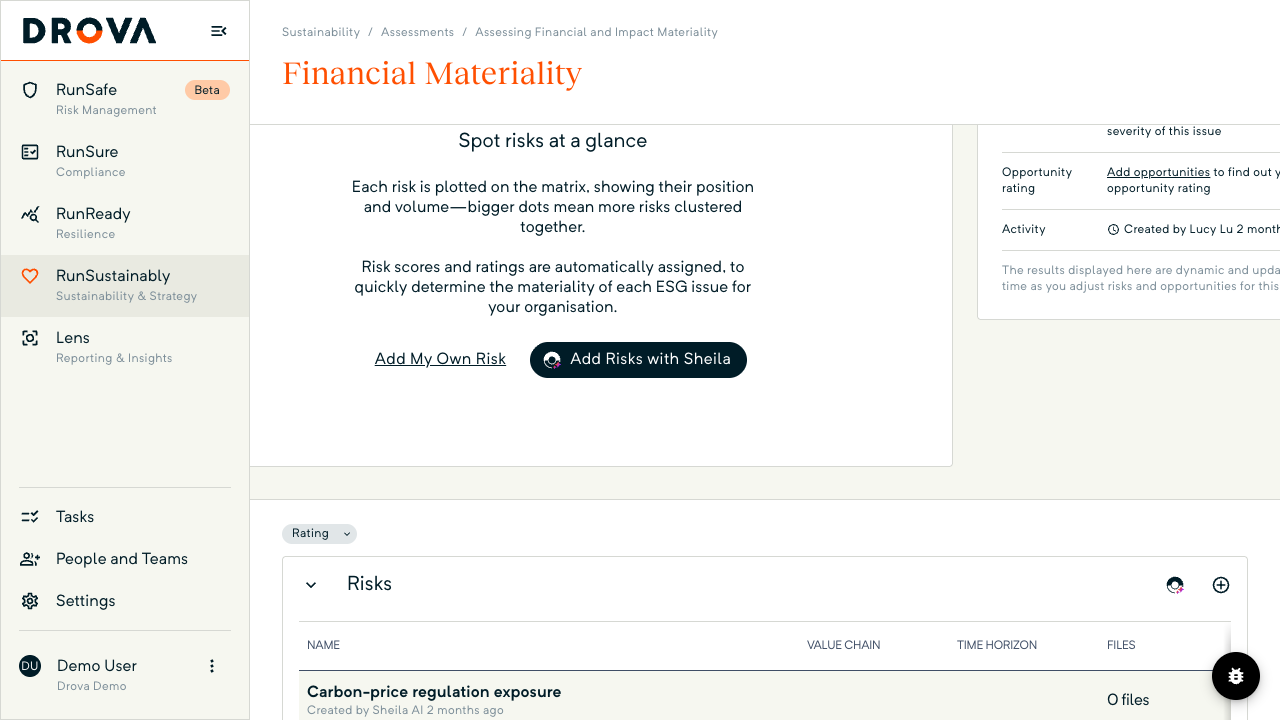
When Sheila finishes, the Risks table fills with rows, each marked Created by Sheila AI under its name. Each arrives with a name, description and rationale written but no likelihood or consequence, no Value Chain or Time Horizon, Files at 0 files and Status at Not Started. Nothing counts towards the issue's result yet.
To discard a draft, open it and choose Delete Risk; there is no bulk reject. For another round, use the small Sheila icon in the Risks header. Risks you add with Add My Own Risk sit in the same table under your name.
In Drova
Score each risk you keep and mark it Complete
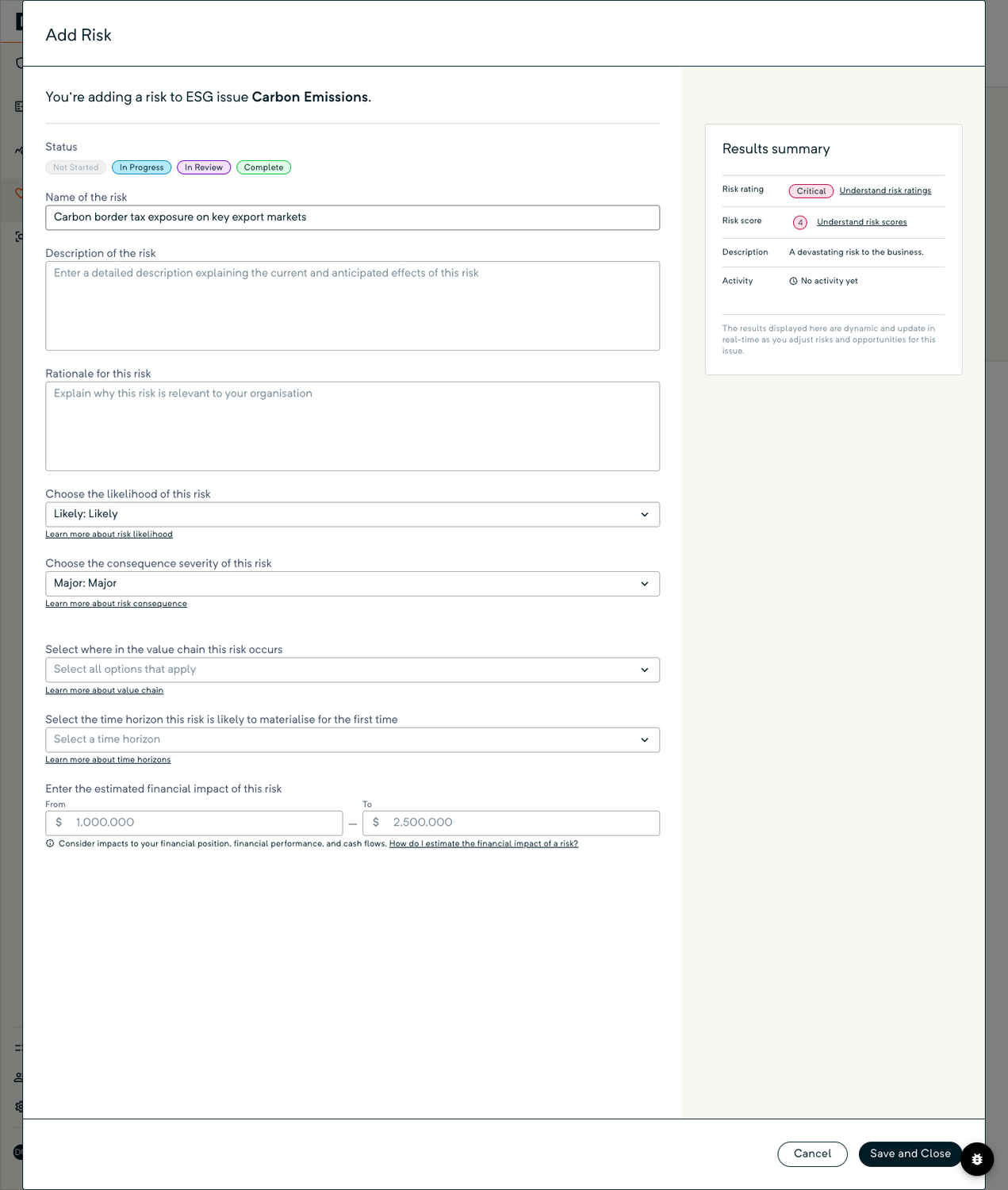
Click a row to open Edit Risk, the same form as Add Risk. Put Name of the risk, Description of the risk and Rationale for this risk in your own words, then set the likelihood and consequence. The Results summary derives the Risk rating, from Minimal to Critical, and a Risk score from 0 to 4 as you go.
Choose the value chain position and time horizon, attach evidence, and add an estimated financial impact if known. Set Status to Complete and choose Save and Close. Only Complete risks plot on the matrix and feed the issue's result; one rated Significant or Critical returns a Material verdict, as explained in how to read your materiality matrix and results. Any later edit drops the status back to In Progress.
Tip
Worked example
A Group 2 wine producer in South Australia opens its carbon emissions issue and asks Sheila for risks. Four drafts come back: a carbon border tax on exports, a domestic carbon price on fuel, higher energy costs during grid transition, and customer pressure for emissions data. The sustainability lead keeps the first and the last, rewrites the export risk to name the two markets the business actually sells into, and deletes the fuel draft, which does not apply. She adds one Sheila could not know about: an emissions reporting clause in the contract with its largest retail customer.
The export risk scores Likely and Major over the medium term, with an estimated impact of $1 million to $2.5 million, and returns a Critical rating. The contract risk scores Possible and Moderate. Both are marked Complete, the issue reads Material, and the export risk goes into the enterprise risk register with the CFO as owner. Figures are illustrative. For how the same modules carry a climate issue through to the disclosure report, see the AASB S2 solution page.
Product guide. Steps and screenshots come from Drova product captures on a demo tenant, checked against the product atlas on 25 September 2026. Not yet reviewed by Customer Success; if a label or step differs from what you see in Drova, use the feedback below.
Frequently asked questions
Does Sheila decide which climate risks are material?
No. Sheila drafts a risk's name, description and rationale. Your team scores likelihood and consequence, sets the value chain and time horizon, and marks the risk Complete. The Material verdict comes from those scores, not from the draft.
Can I use AI-generated risks in an AASB S2 disclosure?
Yes, provided you can show the process. AASB S2 asks you to disclose how you identified, assessed and prioritised climate-related risks. A record that AI drafted, a named person reviewed, and which drafts were kept, rewritten or discarded is a process you can describe.
What are typical climate risks for a materiality assessment?
Physical risks such as extreme heat, flood, storm and drought at your sites and your suppliers' sites. Transition risks such as carbon pricing, changing customer or lender expectations, technology shifts and new regulation. A useful risk names the event, the part of the business and the time horizon.
Does Sheila draft opportunities too?
Yes, but separately. Add Opportunities with Sheila in the Opportunities section runs its own flow. AASB S2 expects opportunities to be assessed and disclosed where material, so run both.
Can I ask Sheila for another round?
Yes. Once rows exist, the Sheila icon in the Risks header runs the flow again and adds to the list rather than replacing it. Delete any draft you do not want.
Was this article helpful?
Related articles
- Drova help articles
Every product guide, in one place.
- How do you assess financial materiality for AASB S2?
The assessment these drafted risks belong to.
- How do you assess climate-related opportunities for AASB S2?
The sibling flow: Sheila drafts opportunities separately.
- How do you add climate risks to your risk register?
Take the material ones into RunSafe with an owner and controls.
- How do you add climate issues to your materiality assessment?
Get the issue right before you ask Sheila for risks.
Still stuck? Contact support.
