Product guide · RunSafe module · Updated 24 September 2026
How do you add climate risks to your risk register?
A climate risk in your risk register is a climate-related physical or transition risk recorded in the enterprise risk register with an owner, a score, controls and a review date. It matters because AASB S2 asks you to show how climate risks are integrated into your overall risk management, and the material ones must reconcile to your disclosure. Drova helps by holding the register in RunSafe, the risk and controls module of the RunGood platform. This guide covers how to frame a climate risk, then the steps in Drova to record, score, own and flag it for disclosure.
Short answer
You add a climate risk to the register the same way you add any other risk in the enterprise risk register: name the event, the part of the business it affects and the time horizon, score its inherent likelihood and consequence, assign an owner, record the controls and the residual score, and set a review date. What AASB S2 adds is the link to disclosure: the risk management pillar asks you to show that climate risks run through your enterprise risk process, and material climate risks must be flagged so they flow into the report.
- Not a separate register. AASB S2 asks how climate risk is integrated into overall risk management, so a climate risk belongs in the enterprise risk register everyone already uses.
- Named, with a review date. A climate risk with no owner is a finding waiting to happen. Assign the risk like any other risk.
- Flagged for disclosure. Material climate risks are the ones that appear in the report; the materiality flag is what makes them findable.
Note
Before you start
This guide is for the person preparing or reviewing the AASB S2 disclosure: a sustainability lead, a finance lead or a risk manager. Have last year's financial report, your risk matrix and your current climate issue list to hand. If AASB S2 is new to your organisation, the ASRS readiness assessment shows where the register sits in the wider preparation, and How do you set up AASB S2 in Drova for the first time? covers the tenant setup this guide assumes. Account help, sign-in and security settings are covered in the Drova help centre, not here.
How do you frame a climate risk for the register?
A climate risk is framed for the register as an event with a cause, an effect, a time horizon, a score, an owner and controls, the same shape as every other risk. A physical risk comes from the climate itself, such as flood, drought or heat. A transition risk comes from the shift to a lower-carbon economy, such as a carbon price, a policy change or a shift in customer demand.
- Write the risk as an event with a cause and an effect. Not "climate change" but, to take an illustrative example, "a repeat of the 2022 floods closes the Brisbane distribution centre for two weeks, interrupting supply to 40 stores". Physical or transition, name which.
- Attach the time horizon. Short, medium or long term, using the same definitions as your AASB S2 disclosures, so the register and the report agree.
- Score inherent likelihood and consequence. Use the corporate matrix. Consequence is financial and operational; keep the scale you already use so climate risks rank against everything else.
- Assign an owner and record the controls. Controls might be insurance, a second supplier, a site upgrade or a transition plan. Score the residual risk after controls. How do you assign owners and tasks for AASB S2 work? covers ownership across the whole programme.
- Flag the risk as material where it clears the threshold. The materiality flag ties the register to the disclosure. Anything flagged material should reconcile to the risks in your AASB S2 report and to your financial materiality assessment.
- Set the review date and the escalation path. Climate risks move with the weather, the regulator and your footprint. A dated review keeps the register honest.
What the regulator requires
AASB S2 Climate-related Disclosures is the Australian Sustainability Reporting Standard that sets out what a reporting entity must disclose about its climate-related risks and opportunities, and the standard applies to both physical and transition risks. Under the risk management pillar, AASB S2 requires you to disclose the processes you use to identify, assess, prioritise and monitor climate-related risks and opportunities, and whether and how those processes are integrated into and inform your overall risk management process. A register that treats climate risk like every other risk, with owners, controls and review dates, is the simplest evidence of that integration.
Reporting is phased under the Corporations Act 2001 across three groups, starting with the largest entities for financial years beginning on or after 1 January 2025, with the thresholds for each group set out in ASIC Regulatory Guide 280. Check your group on the applicability page. The disclosures the register feeds are listed on the AASB S2 disclosures checklist.
In Drova
Add the risk to the register
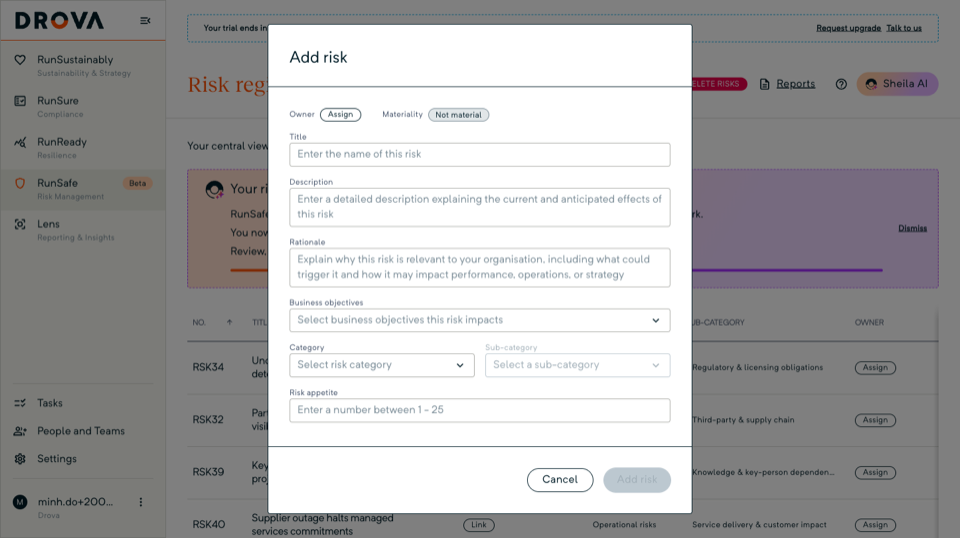
Open RunSafe, then the risk register, and choose Add risk. Give the risk its event-shaped name in Title, and complete Description and Rationale. Pick the Category and Sub-category: on the demo tenant the category is Strategic and the sub-category is ESG, sustainability & climate; your tenant uses the categories Sheila drafted at setup or your admin edited under Settings, Risk management.
On a new tenant, Drova first opens the Risk framework setup page, where Sheila, Drova's AI assistant, drafts candidate risks from your matrix for your team to review, or you can customise the matrix first. How do you use Sheila to identify climate risks for AASB S2? covers that path.
In Drova
Score it, own it, treat it
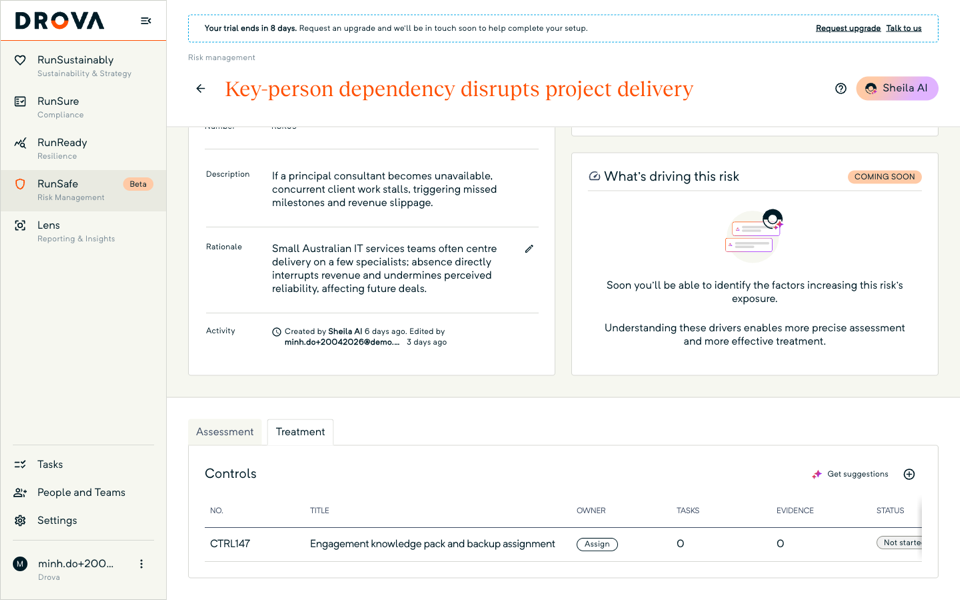
Score the Inherent assessment on the risk detail page: likelihood and consequence on the 5 by 5 matrix, where the risk score is likelihood times consequence from 1 to 25 and the bands run Low, Medium, High, Extreme and Critical. Inherent risk is the rating with no controls in place; residual risk is the rating after the controls you have linked. Set the Risk appetite, assign the owner, and add the controls on the Treatment tab. Then score the Residual assessment after controls, and the Result shows whether the risk sits below, at or above appetite.
The risk's Activity log records each change, which is the trail an assurance provider will ask to see. Assurance over sustainability reports under the Corporations Act is being phased in on the AUASB timeline. How do you build an evidence trail for AASB S2 assurance? covers where the evidence lives.
In Drova
Flag it for AASB S2 disclosure
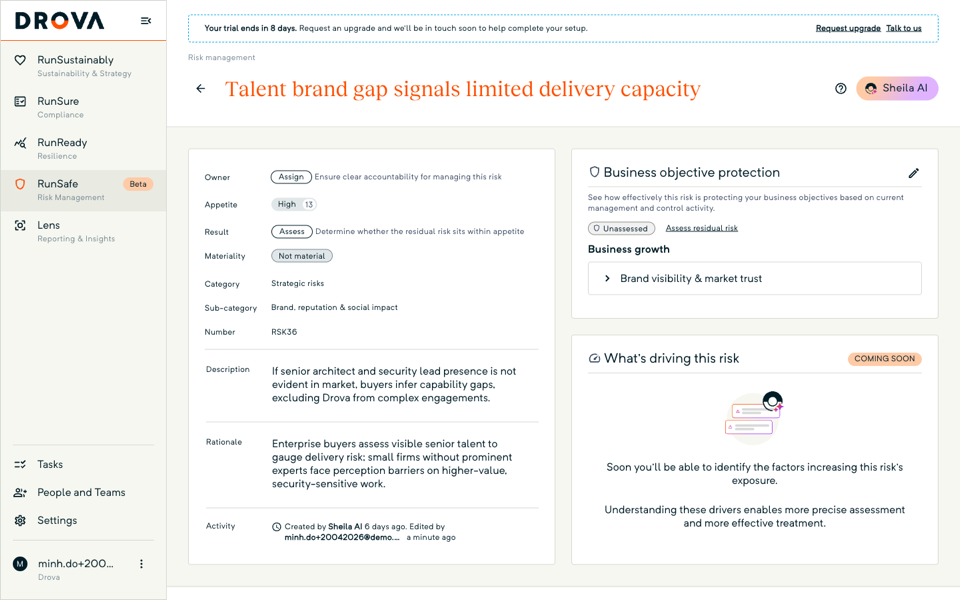
Set Materiality to Material on any climate risk that clears your threshold. The materiality flag is the filter for the climate risks that flow into your AASB S2 disclosure report. A risk that started life in the financial materiality assessment in RunSustainably, the sustainability and materiality module of the RunGood platform, is added to the register by your team, deliberately, so the register only carries risks someone has decided to own. When the flagged risks are in place, How do you generate an AASB S2 disclosure report in Drova? covers the report itself.
Tip
Worked example
A Group 2 regional bank records "prolonged drought reduces agricultural loan book repayment capacity across the Riverina" as a physical climate risk, medium term. Inherent score: likely and major. Controls: sector concentration limits, a drought hardship policy and quarterly portfolio stress tests. Residual score: possible and moderate. The risk is owned by the chief risk officer, flagged material, and reconciles to the strategy and risk management pillars in the bank's AASB S2 disclosure. This example is illustrative; the figures are not from a real entity. The AASB S2 solution page shows how the register, the materiality assessment and the report fit together in Drova.
Product guide. Steps and screenshots come from Drova product captures on a demo tenant, checked against the product atlas on 24 September 2026. Not yet reviewed by Customer Success; if a label or step differs from what you see in Drova, use the feedback below.
Frequently asked questions
Does AASB S2 require a separate climate risk register?
No. AASB S2 requires you to disclose how climate-related risks are integrated into your overall risk management. Keeping climate risks in the enterprise risk register is the clearest way to show that integration.
How is a climate risk different from any other risk in the register?
The framing is the same: an event, a cause, an effect, a score, an owner and controls. What differs is the time horizon, which is often longer, and the disclosure link, which means material climate risks must reconcile to the AASB S2 report.
Should physical and transition risks be recorded separately?
Yes. Record physical and transition risks as separate risks with different causes, because their controls differ. A flood at a site and a carbon price on your fleet are managed by different people with different levers, and AASB S2 treats physical and transition risks as two distinct types of climate-related risk.
Do climate risks from the materiality assessment sync into the register automatically?
No. The separation is deliberate: a person adds the material risks to the register so that every register entry has an owner who has accepted it.
What is the materiality flag for?
The materiality flag marks the climate risks that meet your disclosure threshold so they can be found, reported and reconciled against the AASB S2 report.
Was this article helpful?
Related articles
- Drova help articles
Every product guide, grouped by stage.
- How do you assess financial materiality for AASB S2?
Score, evidence and complete the assessment your disclosure rests on.
- How do you use Sheila to identify climate risks for AASB S2?
Let Sheila draft candidate climate risks for your team to review.
- How do you assign owners and tasks for AASB S2 work?
Give every clause and control an owner and a due date.
- How do you build an evidence trail for AASB S2 assurance?
Where the evidence lives, and how an assurance provider finds it.
Still stuck? Contact support.
