Product guide · RunSure and Reporting · Updated 25 September 2026
How do you track AASB S2 compliance progress?
Tracking AASB S2 compliance progress means knowing, at any date, which clauses of the standard have an owner, which have been worked, and which the evidence shows are met. It matters because the sustainability report is lodged with the annual report and assurance is phasing in, so the board needs a dated view it can stand behind. Drova helps through RunSure, the compliance module of its RunGood platform, which rolls clause results up on the framework page and exports a Compliance Status report. This guide covers how to track progress so it holds up under assurance, then the steps in Drova to read the roll-up, filter the clause tree and download the report.
Short answer
You track AASB S2 compliance progress by giving every clause an owner, a compliance result and a work status, then reading the counts back at framework level on a cadence you keep. Two questions matter and they are not the same: has the work been done, and does the evidence show the clause is met. Count both, filter to the clauses that are unassessed or not compliant, and put the same dated status report in front of the board each cycle.
In Drova, the AASB ASRS S2 framework page in RunSure rolls up clause results and control effectiveness, the clause tree filters by result, and the Compliance Status download gives you the spreadsheet for the board pack.
- Clause, requirement and evidence. A clause is one numbered disclosure paragraph of AASB S2. A requirement is one specific item of work that shows the clause is met. Evidence is the document or record attached to a requirement that proves it.
- Result and status are different. The compliance result says whether the evidence shows a clause is met. The work status says whether the work on it has started, is in progress or is complete. A clause can be worked to completion and still not be met, so track both.
- Count at the clause, attest at the requirement. The clause result summarises the requirements beneath it, so the honest number comes from attesting each one.
- Same report, every cycle. Board oversight sits under the governance pillar, so a series of dated status reports is evidence in its own right.
Note
Before you start
This guide is for the person running the AASB S2 work week to week: a sustainability lead, a compliance manager or a risk manager who reports progress to the CFO or the board. Have the AASB ASRS S2 framework active in RunSure, owners assigned to the clauses, and last cycle's status report to hand.
It does not cover setting the framework up or working an individual clause; those have their own guides. If you are not yet sure how far along your process is, the AASB S2 readiness assessment scores it before you start counting clauses. Account help, sign-in and security settings are covered in the Drova help centre, not here.
How do you track progress against AASB S2?
- Fix the scope before you count. Decide which clauses apply and mark the rest not applicable, with the reason written down. A progress number over the wrong denominator is the first thing an assurance provider will test.
- Give every clause an owner and a date. A clause with no owner never moves. Assign the person who holds the evidence, not the coordinator, and agree when they will attest. See how to assign owners and tasks for AASB S2 work.
- Track work status and compliance result as two fields. Status says whether the clause is started, in progress or done. Result says whether the evidence shows the clause is met. Report both, because a clause can be finished and still not compliant.
- Attest at the requirement, not the clause. Break each clause into the requirements that would prove it, attach evidence to each one and set its result. Attesting means setting a requirement's result with its evidence attached. The clause result should summarise those attestations; the evidence trail guide covers what to attach.
- Review the unassessed and not compliant lists on a fixed cadence. A monthly cycle gives each owner a clear deadline. Filter to those two results, ask each owner what is blocking them, and log the decision.
- Snapshot the status report and keep every version. Download the same report each cycle, date it, and file it with the board pack. The series shows how oversight worked, which matters under the governance pillar and again when assurance phases in.
What the regulator requires
AASB S2 Climate-related Disclosures, issued by the AASB in September 2024 and based on IFRS S2, requires disclosure across four pillars: governance, strategy, risk management, and metrics and targets. Board oversight sits under governance; the process used to identify, assess, prioritise and monitor climate-related risks and opportunities, and how it is integrated into overall risk management, sits under risk management. Neither can be written credibly without a record of what was done, by whom, and when.
Reporting is phased under the Corporations Act 2001: Group 1 from annual reporting periods beginning on or after 1 January 2025, Group 2 from 1 July 2026 and Group 3 from 1 July 2027, with the thresholds for each group in ASIC Regulatory Guide 280.
The sustainability report forms part of the annual report and is lodged with ASIC. Assurance over it phases in for each group under the AUASB's ASSA 5010 timeline, which sets out when limited and reasonable assurance apply. Check your group on the applicability page.
AASB S2 sets out what to disclose, not how to track your way there. The tracker's job is to show, at any date, which disclosures are evidenced and which are not. The AASB S2 disclosures checklist lists them clause by clause and is the natural denominator for the count.
In Drova
Read the roll-up on the framework page
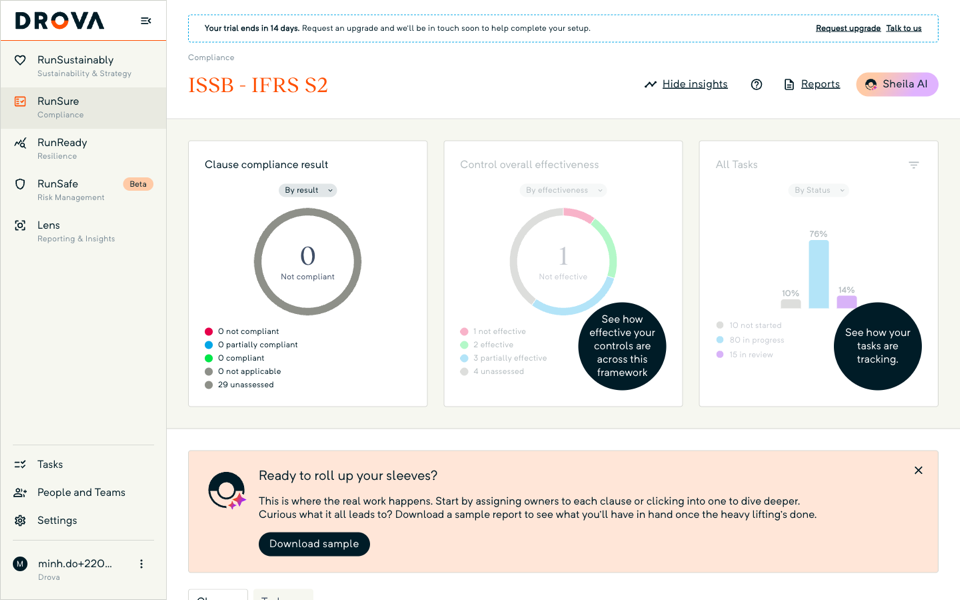
The roll-up sits in three panels at the top of the framework page. Open RunSure. The Compliance page lists your frameworks as cards; on the active AASB ASRS S2 card, choose Manage compliance. Clause compliance result counts the clauses that are not compliant, partially compliant, compliant, not applicable and unassessed; switch its By result selector to the status view and the panel becomes Clause status. Control overall effectiveness and All Tasks sit beside it.
Each clause result rolls up from the requirements beneath it: a clause reads compliant only when every assessed requirement is compliant, and a mix reads partially compliant. Read the two clause cuts together, because a clause can be complete and still not compliant.
In Drova
Filter the clause tree by result
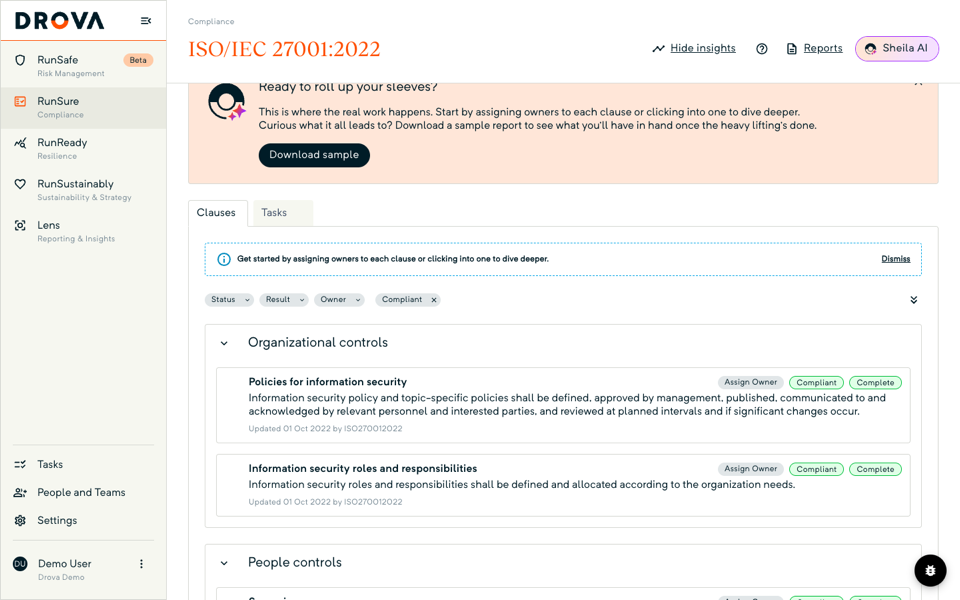
The Result filter above the clause tree narrows the Clauses tab to one result at a time. The tab lists every section and clause of the standard, and each clause row carries three lozenges: the owner, or Assign Owner if nobody holds it yet; the result, one of Compliant, Partially compliant, Not compliant, Unassessed or Not applicable; and the work status, Not started, In progress or Complete.
Set the Result filter to Unassessed to see what has not been touched, then to Not compliant for what needs remediation; sections stay visible so you keep your place in the standard. Add the Owner filter to build one person's list before a check-in. Open any clause from its row to attest the requirements beneath it.
In Drova
Download the Compliance Status report
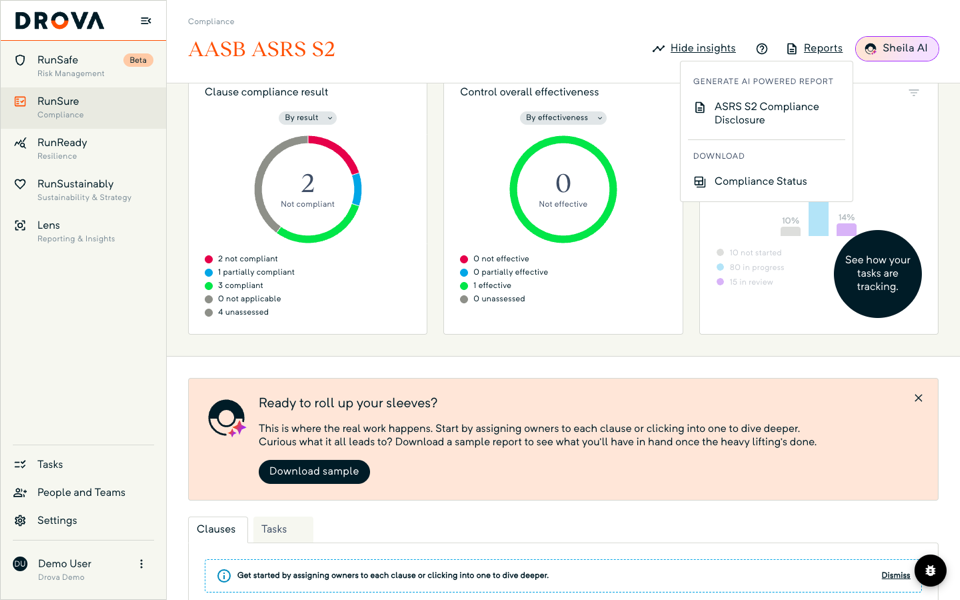
The Compliance Status report is a one-off spreadsheet download from the framework header. Open Reports, and under Download choose Compliance Status. Drova builds a spreadsheet of the framework's clause-by-clause status, owners and compliance results and sends it to your browser, named for the framework and the date. It is not a stored report. On a framework with no active clauses you see Unlock your compliance status report instead, with Download sample to preview the layout.
On AASB ASRS S2 the same menu also offers ASRS S2 Compliance Disclosure under Generate AI powered report; that document is generated in the background and lands in Reporting, where each row shows its Type, Created by and Date modified. See how to generate an AASB S2 disclosure report. File the dated spreadsheet with each board pack.
Tip
Worked example
A Group 2 aged care provider with 18 residential homes activates AASB ASRS S2 in its first reporting period and gives each clause group an owner: the company secretary takes governance, the CFO takes strategy and metrics, the risk manager takes risk management. At the first monthly review the framework page shows four clauses compliant, six partially compliant, three not compliant and 12 unassessed.
The risk manager filters the tree to unassessed, finds that nine of the 12 sit under metrics and targets, and learns the Scope 1 and 2 figures are waiting on the energy retailer's data. The team logs that as the blocker, sets a date, and downloads the Compliance Status spreadsheet for the audit and risk committee. Three cycles later the same download shows 19 compliant, four partially compliant and two not applicable, and the dated spreadsheets sit side by side in the board pack. Figures are illustrative.
For how RunSure supports the whole AASB S2 cycle, see the AASB S2 solution page.
Product guide. Steps and screenshots come from Drova product captures on a demo tenant, checked against the product atlas on 25 September 2026. Not yet reviewed by Customer Success; if a label or step differs from what you see in Drova, use the feedback below.
Frequently asked questions
Why does a clause show partially compliant when all its tasks are finished?
Because the clause result rolls up from its requirements, not its tasks. If one requirement is compliant and another is not, the clause reads partially compliant however many tasks are closed. Open the clause and attest each requirement.
Does the Compliance Status report appear in Reporting?
No. It downloads straight to your browser as a spreadsheet each time you request it, so keep each dated copy yourself. The AI-generated ASRS S2 Compliance Disclosure is the report that lands in Reporting.
How often should we report progress to the board?
Pick the cadence your governance process can sustain and keep a dated status report from each cycle. Board oversight sits under the governance pillar, so the series is evidence of oversight.
Can Sheila track progress for us?
Sheila drafts the requirements under each clause and suggests what to do next from the framework page. Your team sets every compliance result and owns every attestation; the counts reflect those decisions, not Sheila's.
What if a clause does not apply to us?
Mark it not applicable and keep the reasoning on file, because an assurance provider will test that scoping decision. The clause drops out of the roll-up so your counts are over the right denominator, and the decision can be reversed later without losing any requirement work.
Was this article helpful?
Related articles
- Drova help articles
Every product guide, in one place.
- How do you assign owners and tasks for AASB S2 work?
Owners and dates are what make the counts move.
- How do you work an AASB S2 clause in Drova?
Attest the requirements that roll up into the clause result.
- How do you build an evidence trail for AASB S2 assurance?
The evidence behind every compliant result.
- How do you generate an AASB S2 disclosure report in Drova?
From an active framework to a downloadable disclosure.
Still stuck? Contact support.
